The AI model your workflow runs on is being retired. How to switch without breaking it
By Validure team · · 15 min read
Providers retire AI models on a fixed timetable, and requests to a retired model simply fail. How to find every place a model name hides, build a 200-case test you can rerun in an afternoon, read the side-by-side results, and switch with a rollback plan. Dates checked against the providers' own deprecation pages.

Say a 40-person distributor set up a small AI step last year. Supplier emails come in, a model reads each one, sorts it into "invoice", "statement", "dispute" or "other", and pulls out the invoice number and amount for the accounts team. It runs about 3,000 times a month. Nobody has touched it since the freelancer who built it left. Then an email arrives from the AI provider saying the model it uses will be retired on a date six weeks away.
Most small firms file that email and find out what it meant on the morning the step stops working. This post is for doing it the other way round: what "retired" means, where model names hide, a test you can rerun in an afternoon, how to read it, and how to switch with a way back. There's a little code; the checks don't need a developer to understand.
Retired means the request fails, not that it gets worse
Anthropic's deprecation page defines a deprecated model as one that "is still functional but no longer recommended" and has a retirement date, and a retired model as one that "is no longer available for use". It adds that requests to retired models fail. OpenAI uses "deprecated" in the same sense and calls the end point a shutdown, after which the model no longer accepts requests through the standard API.
So there's no slow fade. On the retirement date your call returns an error, and whatever was downstream of it gets nothing.
How much warning you get depends on the provider and the kind of model. These are the stated policies, checked on 24 November 2026:
| Provider | Stated minimum notice | Example from their own page |
|---|---|---|
| Anthropic | At least 60 days for publicly released models | Claude Sonnet 4.5 notified 30 September 2026, retires 30 November 2026 (61 days) |
| OpenAI, generally available models | At least 6 months | GPT-5 and o3 family announced 11 June 2026, shut down 11 December 2026 |
| OpenAI, specialised and image models | At least 3 months | |
| OpenAI, preview models | Much shorter, the page gives two weeks as an example |
Two things in that table catch people out. Sixty days sounds like plenty until you remember the email went to whoever signed up for the API account, who may have left. And preview models, the ones people try first because they're new, carry the shortest notice of all.
As of today, three dates sit close together. Claude Sonnet 4.5 retires on the Claude API on 30 November 2026. On the same day OpenAI shuts down its stored "reusable prompts" feature (the /v1/prompts endpoint) and its Evals dashboard and API. And on 11 December 2026 OpenAI shuts down gpt-5, gpt-5-mini, gpt-5-nano, o3 and o3-pro. Anthropic also announced on 23 November that Claude Opus 4.5 retires on 22 January 2027. If any of those names appear in your systems, the rest of this post has a deadline attached.
A dated model name doesn't protect you
Pinning a dated version, something like claude-sonnet-4-5-20250929, protects you from the model quietly changing under you. It does nothing about retirement. Anthropic's page says the Sonnet 4.5 retirement "includes claude-sonnet-4-5, the same model's ID without a date". Both names stop working on the same day.
OpenAI's page adds a rule that matters if you paid for training: fine-tuned versions of the listed models follow the same shutdown schedule as the base model they were built on. A fine-tune isn't a copy you own; when the base goes, you retrain on a replacement and test again.
And the platform you buy through can change the date. Anthropic's page says its dates apply to Anthropic-operated platforms, while Amazon Bedrock and Google-managed Claude on Google Cloud set their own retirement schedules. If you call a model through a cloud provider, read that provider's model table, not the model maker's.
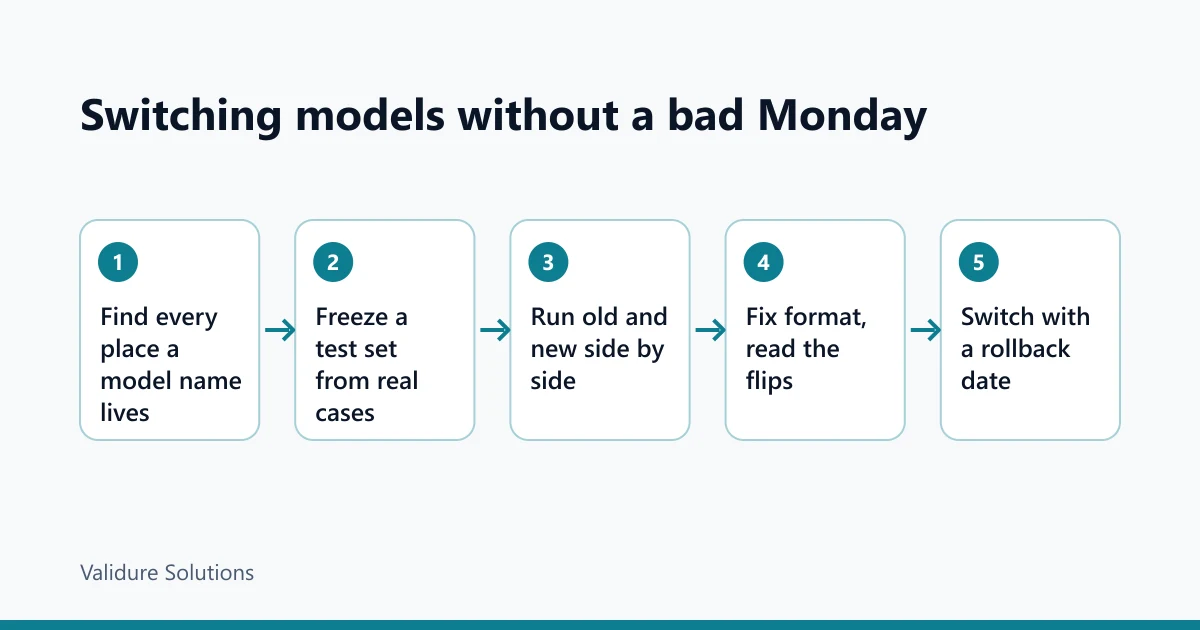
Step 1: find every place a model name lives
The email names a model. Your job is to find everything that calls it. It's rarely just one place. A typical small firm's list looks like this:
| Where it hides | How to find it | What people miss |
|---|---|---|
| Application code | Search the repositories for the model name, and for the provider's SDK import | Old scripts on someone's laptop or a scheduled job on a spare server |
| Environment variables and config files | Search deployed config, not just the repository | A value overridden on the live server only |
| No-code automation tools | Open each workflow that has an AI step and read which model it's set to | Workflows built by staff who never told IT |
| Vendor products with AI inside | Ask each vendor in writing which model they call and what their switch plan is | You can't fix theirs, but you can ask for a date |
| Stored prompts on the provider's platform | List them in the provider's dashboard | OpenAI's stored prompt objects shut down on 30 November 2026, model or no model |
| Fine-tuned models | List them in the provider's dashboard | They retire with their base model |
There's a shortcut for the first three rows. Your provider's usage records show which models your keys actually called. Anthropic's page describes it: go to the Usage page in the Claude Console, click Export, and the CSV breaks usage down by API key and model. If a key you didn't know about shows calls to a retiring model, you've found something that search missed.
Write the list down with an owner per row. A model switch fails most often on the row nobody owned.
Step 2: freeze a test set from real cases
You can't judge a new model by trying a few examples and nodding. You need a fixed set of real inputs with the right answers written down, so you can run old and new on the same set and compare.
For the email sorter in our example, that means pulling 200 recent supplier emails and writing down, for each one, the right category, invoice number and amount. Why 200? It's enough that one case is half a percentage point, so a real difference shows, and small enough that a person can label it in a day. If your step is rarer or riskier, label fewer but choose them on purpose: every awkward case you've seen go wrong belongs in the set.
A few rules make the set worth keeping:
- Take cases from real traffic across several weeks, not from one good day.
- Include the ugly ones: forwarded chains, scanned attachments, two invoices in one email, Hindi and English mixed.
- Write the right answer before you run any model, so the model can't anchor you.
- Store the set next to the prompt, with a date. You'll reuse it at the next retirement.
The cost of a run is easy to estimate. Say each case is about 1,500 tokens of input (prompt plus email) and 200 tokens of output. Then 200 cases is 200 x 1,700 = 340,000 tokens per model per run. Multiply by the provider's price per million tokens for each model. For most small workflows a full comparison of two models costs less than the hour of staff time it saves the first time it catches a break.
Step 3: run old and new side by side
While the old model still works, run both on the same set with the same prompt. Change one thing only: the model name. Then score both.
If you have a developer, the whole harness is short. This is a sketch in Python; call_model stands for whichever provider SDK call you already use.
import json

def score(model, cases, prompt):
    results = []
    for case in cases:
        raw = call_model(model, prompt, case["email"])
        try:
            out = json.loads(raw)
        except json.JSONDecodeError:
            results.append({"id": case["id"], "result": "unparseable"})
            continue
        if out.get("category") != case["category"]:
            results.append({"id": case["id"], "result": "wrong category"})
        elif out.get("amount") != case["amount"]:
            results.append({"id": case["id"], "result": "wrong amount"})
        else:
            results.append({"id": case["id"], "result": "correct"})
    return results
Keep the per-case results, not only the totals.

Step 4: read the results properly
Here's an example run for the email sorter. The numbers are made up for illustration, but the pattern is a common one.
| Result | Old model | New model, same prompt | New model, prompt adjusted |
|---|---|---|---|
| Correct | 186 | 181 | 190 |
| Wrong category | 9 | 6 | 7 |
| Wrong amount | 3 | 2 | 1 |
| Unparseable output | 2 | 11 | 2 |
| Total | 200 | 200 | 200 |
| Correct rate | 93.0% | 90.5% | 95.0% |
Read the middle column too fast and you'd conclude the new model is worse: 90.5 against 93.0. Look at the rows and it's the opposite. The new model made fewer real mistakes (6 wrong categories against 9, 2 wrong amounts against 3). What went up was unparseable output, from 2 to 11. That's a formatting change, typically the new model wrapping its JSON in a code fence or adding a sentence before it. Formatting is the cheapest thing to fix.
The fix in the third column was two changes: use the provider's structured output feature, where it has one, so the response must match a schema, and strip anything outside the JSON before parsing. Then rerun. 190 correct, 95.0 per cent, better than where you started.
Totals still hide one thing: which cases changed. For the same-prompt run, put old and new next to each other case by case:
| New model correct | New model wrong | Total | |
|---|---|---|---|
| Old model correct | 175 | 11 | 186 |
| Old model wrong | 6 | 8 | 14 |
| Total | 181 | 19 | 200 |
The 11 cases in the top right are the ones to read one by one. They used to work and now don't. Even when the overall rate goes up, these are the ones a colleague notices, because they worked last week. Eleven emails is twenty minutes of reading, and it usually turns up a pattern: a supplier format read differently, or an instruction the old model followed by habit and the new one follows literally.
That last point is worth expecting. Newer models often follow the prompt more exactly. A prompt that said "extract the amount" and relied on the old model guessing you meant the invoice total, not the balance due, may now get the other number. The fix is to say what you meant, in the prompt, once.
Step 5: look beyond the model name
Sometimes the model is fine and the request breaks anyway. Anthropic's page shows a good example. API version 2026-10-21 removed the temperature, top_p and top_k parameters, and requests that send them on that version get an error (a 400). Code written two years ago sets temperature almost by reflex. Move it to a new model or API version and the call fails before the model sees a word.
OpenAI's 30 November shutdown is the other kind. If your prompts live as stored prompt objects on the provider's platform, they go away on that date whatever model they point at. The lesson is the same as for the test set: keep prompts in your own repository, versioned, next to the code that uses them. The provider's dashboard is a convenience, not your records.
Here's the short checklist we run before calling a switch done:
| Check | What to look for | What a hit means |
|---|---|---|
| Model names | Search code, config and automation tools for the old name after the change | A caller you missed; it fails on the retirement date |
| Request parameters | Parameters the new model or API version rejects or ignores | Errors on first call, or behaviour you thought you'd set but didn't |
| Output format | Unparseable rate on the test set | Use structured output and validate before anything downstream reads it |
| Flipped cases | Cases right before and wrong now | Read each one; fix the prompt or accept them in writing |
| Cost per run | Input and output tokens per case, old against new | Newer models can use more output tokens; check the monthly figure |
| Speed | Time per case at your normal volume | A slower model can break a timeout in another system |
Step 6: switch with a way back
Put the model name in exactly one place, a config value, so switching is a one-line change and switching back is too. Then plan the switch, don't just flip it:
- Switch on a quiet weekday morning, not on a Friday and not on the retirement date itself.
- For the first week, log every input and output, and have someone glance at a sample each day.
- Write down the rollback: which value to change back, and until what date that's possible. Rollback only works while the old model is still alive, which is the best reason to switch weeks before the deadline instead of days.
- After the week, rerun the test set on live behaviour and file the results with the date.
The timing arithmetic is worth doing. With Anthropic's 60-day minimum, a test set built in week one, a comparison and prompt fix in week two, and a switch in week three still leaves about five weeks of rollback. Start in week seven and you have none.
Who doesn't need any of this
If your use of AI is people typing into a chat app, a retirement just means the app picks a newer model. You don't need a test set for that. This matters when a model sits inside a process: something reads its output and acts on it without a person checking every line, or the output lands in your books, your customer messages or your reports.
And if the only AI in your business is inside a product you buy, your job is shorter. Ask the vendor which model they use, when it retires and how they test the switch. A vendor who can't answer that has told you something.
Where we come in
We build software and use these models ourselves, so we have an interest. You can do everything above without us. Where we help is when the AI step sits inside a wider system: finding every caller, moving prompts into version control, adding structured output and validation, and setting up the test run so it's there for the next retirement too. That falls under our AI and intelligent solutions work.
Sources and checks
Dates and policies were checked on 24 November 2026 against the providers' own pages. Providers change these pages; read the current version before you plan.
- Anthropic, Model deprecations: lifecycle definitions, the 60-day notice commitment, the model status table, the Sonnet 4.5 and Opus 4.5 retirements, the note on partner platforms, the usage export, and the API parameter deprecations.
- OpenAI, Deprecations: notice periods by model type, the 30 November 2026 prompts and Evals shutdown, the 11 December 2026 GPT-5 and o3 family shutdown, and the rule for fine-tuned models.
- For models bought through a cloud platform, check that platform's model lifecycle page, as its dates can differ.
The email sorter, its volumes and every test result above are an example, not measurements of any real system or model.
Frequently asked questions
What happens when an AI model is retired?
Requests to it fail. Both Anthropic and OpenAI say a retired or shut-down model no longer accepts requests, so anything that calls it gets an error from that date.
How much notice do providers give before retiring a model?
Anthropic says at least 60 days for publicly released models. OpenAI says at least six months for generally available models, three months for specialised and image models, and much shorter for preview models. Platforms such as Amazon Bedrock set their own dates.
Does using a dated model version stop it being retired?
No. A dated version stops the model changing under you, but it retires on the same date as the undated name.
What happens to my fine-tuned model when the base model is retired?
On OpenAI, fine-tuned versions follow the same shutdown schedule as their base model, so you'll need to retrain on a replacement and test again.
How many test cases do I need to compare two models?
For a routine step, around 200 real cases with the right answers written down is enough to see a real difference and small enough to label in a day. Include the awkward cases you've seen fail.
The new model scored lower on my test. Should I stay on the old one?
You can't stay past the retirement date. Look at why it scored lower: often it's output format, which structured output and validation fix, rather than real mistakes. Then read the cases that flipped from right to wrong and fix the prompt for those.