
Biometric or self-service punch? How attendance capture fails, and how to choose
By Validure team · · 16 min read
Device offline, clock drift, buddy punching, duplicate punches and missing punch-outs. A technical guide to the failure modes of biometric, mobile and paper attendance, with a punch data model, dedupe rule, SQL checks, offline sync and a decision table.
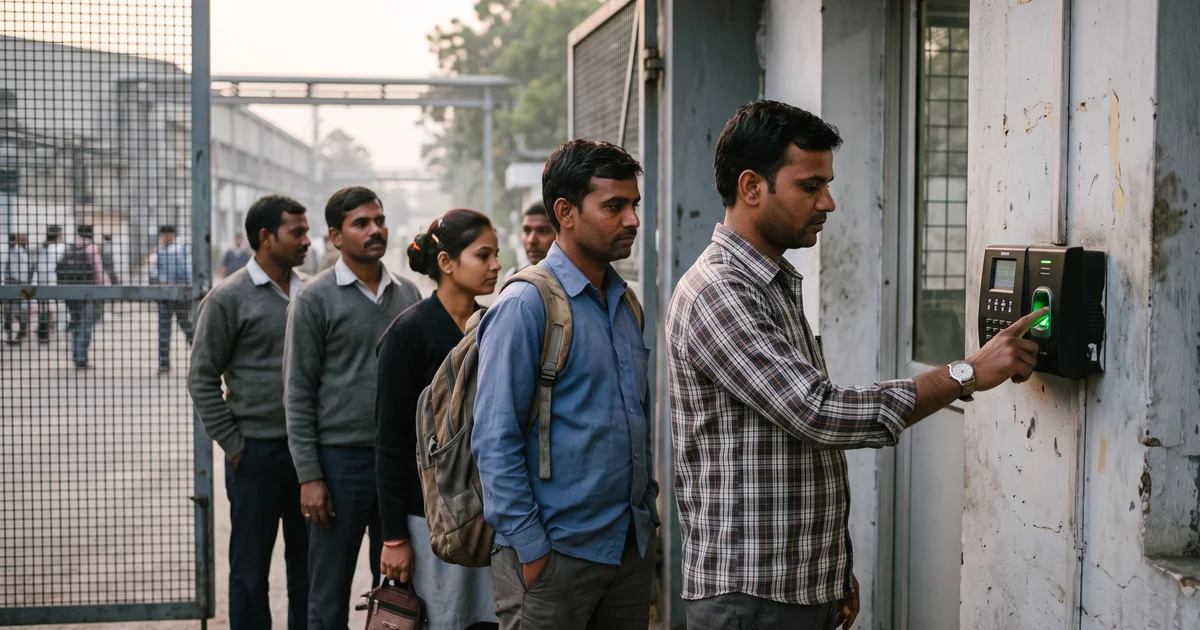
Take a 60-person plant with one gate and one fingerprint device. On the last Saturday of the month the device's network cable gets kicked loose at 7 a.m. Forty people punch anyway, because the device stores events locally. Nobody notices that its clock has also been running three minutes fast since the summer. On Monday the HR executive pulls the file and finds 11 people with a late mark who swear they were early, six with an in-punch and no out-punch, and one man who appears to have clocked in four times in two minutes.
None of that is a payroll problem yet. It lands in payroll anyway.
This post covers how capture fails for each method, what a sane punch record looks like, how to dedupe and flag, and how to choose. You don't need to buy anything from us to use it.
The three methods fail in different ways
| Failure | Biometric device | Mobile or web punch | Paper register |
|---|---|---|---|
| Someone punches for a colleague | Hard (fingerprint or face must match), but possible with shared cards or PINs | Easy unless you add checks | Very easy |
| Device or network down | Device buffers events, which then arrive late and in bursts | Phone may queue the punch, or the app simply fails | Unaffected |
| Clock drift | The device clock drifts and nobody resets it | Phone clock can be changed by the user | Time is whatever the person writes |
| Duplicates | Double taps and retries on a slow sensor | Double submit on a bad connection | Rare |
| Missing punch-out | Worker leaves by another gate or forgets | Forgets to open the app | Forgets to sign |
| Wrong place | Not possible, the device is fixed | The main weakness | Not applicable |
Fingerprint sensors are commonly reported to struggle with worn fingerprints, and a rejected fingerprint becomes a manual correction. On any method the date can also be wrong: a shift that crosses midnight, or a server that stores UTC, puts a punch on the wrong day. The data model below is built around that.
What a punch record should hold
If all you keep is "Asha, 09:02", you can't tell a duplicate from a second visit or a drifted clock from a late arrival. Keep the raw event and derive everything else from it.
| Field | What it holds |
|---|---|
employee_id, site_id |
Who punched and at which site |
device_id, source |
Which terminal or phone, and whether it was biometric, mobile, web or manual |
client_event_id |
A unique ID made on the device for each punch |
device_time |
What the device's clock said |
received_at |
When the server heard about it |
clock_offset_s |
Server time minus device time, when known |
location and accuracy_m |
Raw coordinates and how accurate the phone says they are |
status |
Accepted, duplicate or rejected |
work_date |
The shift day, assigned when the punch arrives |
You also need a short list of sites, each with its coordinates and fence radius, and a table of the minimum travel time between each pair of sites.
The unique client_event_id makes a retry harmless. A phone that resends the same punch three times leaves one record. A person who taps twice is a different event, which is what the debounce rule is for.
device_time and received_at are both stored. The gap between them is your evidence of drift or of a delayed upload.
work_date is assigned when the punch arrives, from the shift window, not from the calendar date of the timestamp. A punch at 00:20 India time on 1 November is 18:50 UTC on 31 October. A system that groups by the UTC date puts a night-shift out-punch on the wrong day, which is how a shift that crossed midnight ends up looking like two half days. India has no daylight saving, but the UTC trap remains.
Status is a column, not a delete, so you can audit the rule later.
Dedupe and debounce: a rule and a worked case
A debounce rule says: after an accepted punch, ignore further punches by the same person within N minutes. Anchor the window on the last accepted punch, not on the last raw punch, otherwise a person who keeps tapping extends their own window forever.
for each event e for employee x, in device_time order:
    last = last accepted event for x (same work_date)
    if last exists and e.device_time - last.device_time < N minutes:
        mark e duplicate
    else:
        mark e accepted
direction = alternate IN, OUT, IN, OUT over the accepted events of the work_date
Here is an example with N = 5 minutes. Asha's raw events on one day:
| Raw event | Gap from last accepted | Result |
|---|---|---|
| 09:02:10 | none | accepted, IN |
| 09:02:44 | 34 seconds | duplicate (double tap) |
| 09:04:30 | 2 min 20 s | duplicate (retry after a slow sensor) |
| 18:31:00 | 9 h 28 min 50 s | accepted, OUT |
| 18:31:20 | 20 seconds | duplicate |
Hours worked: 09:02:10 to 18:31:00 is 9 h 28 min 50 s. Now run the same five events through a naive alternation with no dedupe. It pairs 09:02:10 with 09:02:44 for 34 seconds of work, then 09:04:30 with 18:31:00 for 9 h 26 min 30 s, and leaves 18:31:20 as an in-punch with no out-punch. Same person, same day, two different wrong answers and a false missing punch.
The limit of this rule is that it swallows a genuine quick out and in. If someone steps out at 13:00 and comes back at 13:03, the second event is dropped as a duplicate. Choose N from your floor: two to five minutes suits most offices. Where the device reports direction itself, apply the window per direction instead of alternating.
Three checks that find the damage
Run these before the attendance cut-off, not after payroll. Each works on an export in a spreadsheet.
| Check | What to look for | What a hit means |
|---|---|---|
| Missing punch-outs | Count accepted punches per person per day. Look for an odd count where the first punch is old enough that the shift is certainly over | A forgotten or lost punch-out, so the day would be dropped or guessed |
| Duplicates within N minutes | Sort raw events by person and time, add a column for the gap from the previous event, and filter for gaps under N minutes. This audits what the ingest rule did, and lets you test a new N before you adopt it | A double tap or a retry. If the rule missed one, the rule is wrong |
| Impossible travel | Sort accepted punches by person and time, copy the previous punch's site and time onto each row, and where the site differs, compare the gap with the minimum travel time for that pair of sites | One punch isn't the person, or a clock is wrong |
If you have a developer, this is the query for the first check, written for PostgreSQL:
SELECT employee_id, work_date, MIN(device_time) AS first_punch, COUNT(*) AS punches
FROM   punch_event
WHERE  status = 'accepted'
GROUP  BY employee_id, work_date
HAVING COUNT(*) % 2 = 1
   AND MIN(device_time) < now() - interval '16 hours';
Sixteen hours is an example. Use your longest legitimate shift plus a margin.
The duplicates check compares raw events, so on Asha's day, with N = 5 minutes, it flags three rows.
For impossible travel, the point of the travel-time table is that you set the minimum by hand for each pair of sites, generously. Say two offices are 38 km apart and you set the floor at 60 minutes. A punch at one site at 10:00 and at the other at 10:12 fails by a wide margin. Either one punch isn't the person (a shared phone, a spoofed location) or a clock is wrong. The check builds the review list; a person decides which.
The clock problem
Clock drift is the quiet one. A cheap device clock can gain or lose a few seconds a day. Take an example of 2 seconds a day: after 90 days that's three minutes. With a 09:00 shift and grace to 09:10, someone arriving at 09:08 is stamped 09:11 and marked late. Across 60 people that's the Monday argument.
Sync the device to a network time source if it can reach one. If it can't, record clock_offset_s on every contact and report any device whose offset is beyond a couple of minutes.
Mobile and web punch: the problem moves from the device to the person
A phone solves the queue and the fixed location. It creates two problems: who is holding it, and where they are.
Geofencing compares the reported position with the site's coordinates and a radius. It's cheap and catches the obvious case, someone punching from home. GPS accuracy varies and is often worse indoors, so a radius smaller than the reported accuracy_m fails honest people at the door, mock-location apps exist, and a field team has no single site to fence. The practical rule: set the radius above the typical accuracy you actually see in your data, store the raw coordinates and accuracy rather than a pass or fail, and treat a failed fence as a flag for a manager, not an automatic rejection.
IP allow-listing, where a punch is accepted only from the office network, is a good fit for desk work in one building and no use for people on mobile data. Carrier networks share addresses, and it does nothing against someone on the office Wi-Fi punching for a friend who isn't.
For identity, a selfie check helps against casual proxying and device binding (one phone per employee, changes approved) helps against shared phones. Neither is a guarantee. Where proxying is a serious loss, usually a fixed site with shift workers, a biometric device is still stronger.
Offline sync: capture first, reconcile later
On the device (a terminal or the app), write every punch to a local queue with a generated client_event_id, the device time and a running sequence number. Upload in order, in batches, and delete from the queue only after the server confirms. Because the server drops any event ID it has already seen, a batch that is sent twice is harmless.
On the server, store received_at for every event. When a device reconnects, compute the offset between server time and device time. If the offset is small, keep the device time. If it's large, apply the offset to the buffered events from that session, mark them offset_corrected, and put them on the review list. For phones, a clock that counts from boot, such as Android's elapsed-real-time clock, isn't changed when someone edits the wall clock, so storing it lets the server spot tampering.
Never block the person at the door because the server is unreachable. A punch accepted late and flagged beats a queue and a paper note.
Privacy of biometric data in India
This is where sources disagree, and many are vendor blogs. What follows is my reading of public sources, not legal advice. Check the Act and Rules and ask a lawyer.
The Digital Personal Data Protection Act, 2023 applies to digital personal data, and attendance records of employees are personal data. The Rules under the Act were notified in November 2025, and sources say most obligations on data fiduciaries (the businesses holding the data) begin about 18 months later, in May 2027, with sources disagreeing by a day on the exact date. Until then the older IT Act rules from 2011, which treat biometric data as sensitive personal data, are described as continuing.
Two points matter. First, the Act allows processing without fresh consent for certain legitimate uses, and commentary reads these as covering processing for employment purposes, with attendance management given as an example. Second, the Act as described doesn't create a separate "sensitive data" category the way the European GDPR does, so statements that it treats biometrics as sensitive are probably overstated. I found no clear public position on whether fingerprints specifically can rest on the employment ground or need explicit consent.
My practical position, not legal advice: give employees a plain notice of what you collect and why, offer a non-biometric alternative to anyone who objects, store templates rather than images where the device allows it, delete them when the person leaves, and secure the device and the exports. Commentary on the penalty schedule puts the highest figure, up to 250 crore rupees, on failing to keep reasonable security safeguards, so storage matters as much as consent wording.
One more caution. Do not use Aadhaar-based authentication for attendance without specific legal advice. The Supreme Court's 2018 judgment struck down the part of Section 57 of the Aadhaar Act that let private bodies authenticate under a contract, and later changes to the rules are disputed in the sources I found.
Choosing by workplace
| Workplace | What I'd use | Why | What to add |
|---|---|---|---|
| One factory, fixed shifts, 50 to 500 people | Biometric at the gate | Identity matters, location is fixed | Two devices at the gate for shift change, a buffer and a clock check |
| Office under about 30 people | Self-service web or phone punch, or a sheet | Proxying is socially costly, queues are short | Weekly review of exceptions |
| Retail chain with many small stores | Self-service punch tied to the store | Too many sites for one device each | Geofence by store, manager approval |
| Field sales or service | Mobile punch with location stored | No fixed place to put a device | Impossible-travel check, visit logs |
| Construction or contract labour | Device or supervisor entry at the site gate | Phones and signal are unreliable | Offline buffer, supervisor attendance sheet as backup |
| Remote or hybrid | Self-service punch, or a timesheet | Nothing physical to measure | Agree what counts as present |
| Mixed (plant plus field) | Both, one record | Different people, same payroll | One data model, one correction process |
Match the control to the loss: a gate device for proxy punching, a geofence for wrong-place punching, a review list for forgotten punches. At a ten-person firm a biometric device costs more, in money and privacy exposure, than the problem is worth.
What a month should reconcile to
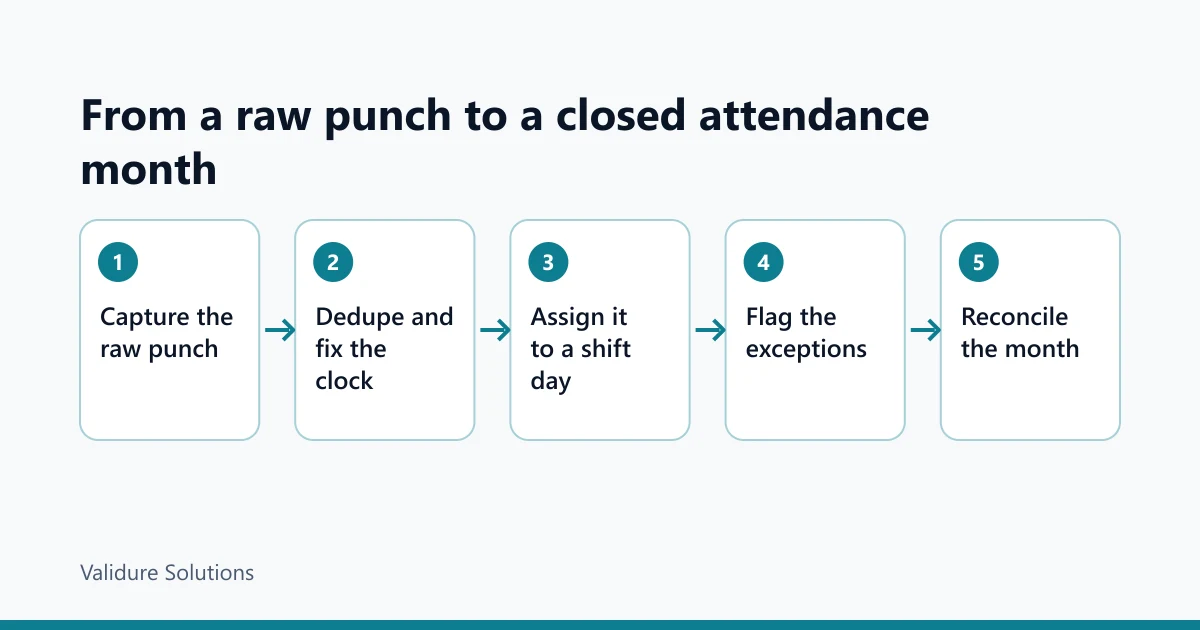
Before attendance goes to payroll, every person-day must land in exactly one bucket. Say a company has 24 employees and the month has 31 days. That's 24 x 31 = 744 person-days, and the buckets must add up to 744.
Take one employee as an example, October 2026:
| Bucket | Days |
|---|---|
| Present (valid in and out) | 20 |
| Weekly off (four Sundays) | 4 |
| Company holidays | 2 |
| Paid leave | 3 |
| Unpaid leave | 1 |
| Absent, no leave | 1 |
| Total | 31 |
20 + 4 + 2 + 3 + 1 + 1 = 31. Payable days are 31 less the unpaid leave and the absence, so 29. A total of 30 means a lost day; 32 means one counted twice, often a leave approved on a day the person also punched.
At company level, check that the buckets sum to headcount times days, that the missing-punch-out check finds nothing, that no correction request is pending, and that the leave-versus-attendance conflict check from the payroll post finds nothing. Then lock the month. Late changes become next month's corrections, with a name and a reason.
Where a system helps, and where it doesn't
The reconciliation above only works if punches, leave and payroll read from the same place. In Validure HR, attendance comes from self-service punch and optional biometric devices, and it sits with leave and payroll, so what you close on is what payroll reads. That's the step it solves, no more.
You may not need it. With a handful of people on one site, a register or sheet plus the checks above is enough. The case grows with shifts, sites and headcount.
If you evaluate any tool, ask what it stores per punch, what it does when a device comes back after six hours, how it treats a shift crossing midnight, and whether you can export raw events if you leave.
Sources and checks
Dates, rates and legal positions change. Verify against official sources: the Ministry of Electronics and IT for the DPDP Act, 2023 and the DPDP Rules, 2025 (including the phase-in dates), India Code for the text of the Act, and UIDAI for Aadhaar authentication. Much of what is published on biometrics and employment under the DPDP Act comes from law-firm notes and vendor blogs, so treat it as commentary. The worked examples use round numbers and are illustrations, not advice.
Frequently asked questions
Is biometric attendance better than mobile punch?
At a fixed site, for stopping proxy punching, yes. For people who work in several places, no. Many companies use both and keep one record.
How do I stop employees punching for each other?
Use a biometric device at a fixed site and avoid shared cards and PINs. For mobile punch, bind one phone to one person, store location and review exceptions. No method removes it completely.
What should happen when someone forgets to punch out?
Flag it, don't guess or auto-close the day. The employee raises a correction with a reason, a manager approves, and the log keeps both the original and the change.
How do I handle a device that was offline for hours?
Let it buffer. On reconnect, upload in order, drop repeats by event id, compare its clock with the server and review any large offset before the cut-off.
Can I make biometric attendance mandatory under the DPDP Act?
I couldn't find a clear public answer on fingerprints specifically. The Act allows processing for employment purposes without fresh consent, per commentary. Safer practice is a clear notice and a non-biometric alternative. Ask a lawyer.
Do small teams need a biometric device or attendance software?
Usually not. Under about ten people on one site, a register or a shared sheet with a monthly reconciliation does the job.
