
Can AI replace my invoice data entry? A 50-invoice test you can run first
By Validure team · · 14 min read
How to find out whether an AI model can take over keying purchase invoices into your books. A test on 50 of your own bills, the accuracy maths that vendors skip, GST arithmetic checks that catch misreads, the real time and cost per month, and where a person still has to look.

Say a distributor gets about 600 supplier bills a month. One person spends most of the first week of every month keying them in: supplier, GSTIN, invoice number, date, taxable value, CGST, SGST or IGST, total. The owner reads that AI can "read any invoice with 99 per cent accuracy" and asks the obvious question. Can we stop typing these?
Mostly, yes. Fully, no. An AI model will read the large majority of your bills correctly, and it will do it in seconds. But the number that decides whether it saves you time isn't the accuracy figure on the vendor's page. It's how many whole invoices come out with at least one wrong field, and how cheaply you can find those. This post shows how to measure that on your own bills before you commit, with the arithmetic for a month like the one above.
It's written for the owner or accounts lead deciding whether to try this, and for whoever sets it up. Who it's not for: a business with a few dozen bills a month. At that volume, typing them is faster than building any of this.
What "99 per cent accurate" usually measures
Most accuracy claims for invoice extraction come from vendors, and they rarely say what was counted. There are two very different measures.
Field accuracy counts each value separately. An invoice with 12 fields has 12 chances to be right. Invoice accuracy counts an invoice as right only if every field on it is right. For posting to your books, invoice accuracy is the one that matters, because a bill with one wrong tax amount is a wrong entry, however good the other eleven fields were.
Here is how far apart the two can be. Say you test 50 invoices and extract 12 fields from each:
| Measure | Count | Result |
|---|---|---|
| Fields extracted | 50 x 12 = 600 | |
| Fields wrong | 18 | |
| Field accuracy | 582 / 600 | 97.0 per cent |
| Invoices with at least one wrong field | 9 | |
| Invoice accuracy | 41 / 50 | 82.0 per cent |
Both numbers describe the same run. A vendor can honestly print the first one. You'll live with the second: roughly one bill in five needs a correction. That's an example, not a benchmark. Your number depends on your suppliers, how the bills reach you and the model you use, which is exactly why you test on your own bills.
Run the test on 50 of your own bills
You don't need a developer for the first round. You need a sample, a sheet and an afternoon.
Pick 50 bills from last month that went through your books already, so you have the right answers. Don't pick the neat ones. Take them in the proportions you really receive: the clean PDFs from large suppliers, the phone photos from small ones, the handwritten kachha bills if you get those, multi-page bills with many lines.
Decide the fields before you start. For most purchase entry it's these twelve: supplier name, supplier GSTIN, your GSTIN as buyer, invoice number, invoice date, place of supply, taxable value, CGST, SGST, IGST, total and whether reverse charge applies. If you post line items with HSN codes and quantities, test those separately, because line tables are where extraction goes wrong most often.
Then run the 50 through whatever you're considering, whether that's a general AI model with a careful prompt, an invoice-extraction service, or the feature inside your accounting tool. Put the output next to what's already in your books, field by field, and mark each mismatch.
Score three things:
- Field accuracy and invoice accuracy, as in the table above.
- Which fields fail. If the errors cluster in one field, such as invoice dates on photographed bills, you can target your checks there.
- Which suppliers fail. Often three or four suppliers account for most of the wrong invoices. Those may be better left to manual entry.
Time yourself keying ten of the same bills by hand while you're at it. You'll need that number later, and most people guess it wrong.

GST arithmetic catches most misreads
The good news is that a GST invoice checks itself. Tax amounts follow from the taxable value and the rate, the totals have to add up, and the tax type follows from where the supplier and the place of supply are. A model that misreads one number usually breaks one of these relationships, and you can test them without reading the bill.
A worked example. A bill from a supplier in your own state shows:
| Field | Value on the bill |
|---|---|
| Taxable value | 42,500.00 |
| CGST at 9 per cent | 3,825.00 |
| SGST at 9 per cent | 3,825.00 |
| Total | 50,150.00 |
The checks: 42,500 x 9 per cent = 3,825, so both tax lines agree. 42,500 + 3,825 + 3,825 = 50,150, so the total agrees. Now say the model read the taxable value as 45,200, a transposed digit. 45,200 x 9 per cent = 4,068, which doesn't match the 3,825 it read for CGST, and 45,200 + 7,650 = 52,850, which doesn't match the total. Two checks fail, and the bill goes to a person.
These are the checks worth running on every extracted bill:
| Check | What to look for | What a hit means |
|---|---|---|
| Tax from rate | Taxable value times each rate, compared with the tax amount read, allowing a rupee for rounding | A misread value, a wrong rate, or a bill with several rates that needs line-level checking |
| Total adds up | Taxable value plus all taxes plus any cess or round-off, compared with the total read | A misread digit somewhere on the bill |
| CGST equals SGST | The two amounts on an intra-state bill | A misread, or tax booked under the wrong head |
| Tax type matches the states | The first two characters of the supplier's GSTIN against the state of the place of supply: same state usually means CGST and SGST, different states usually IGST | A misread GSTIN or place of supply, or a supplier invoice that is itself wrong and worth querying |
| GSTIN is well formed | 15 characters, a known state code, a PAN-shaped middle section, and a valid last check character | A misread character, which the check character usually exposes |
| GSTIN exists | Look up new suppliers on the GST portal's Search Taxpayer page | A misread GSTIN, or a supplier whose registration isn't active, which matters for your input tax credit |
| Duplicate bill | Same supplier GSTIN and invoice number already in your books | A bill keyed twice, or a supplier who reused a number |
| Date is plausible | Not in the future, not before the supplier's earlier bills, inside the period you're booking | A day and month swapped, very common on photographed bills |
A caution on the tax-type check. Place of supply rules for services have exceptions, so a mismatch is a reason to look, not proof of an error. The GSTIN check character catches most single misread characters, but the portal lookup is the authoritative check, and that's a reason to look up every new supplier once rather than trusting a format test.
The check won't catch everything, and that decides your design
Go back to the test. Say the checks above flagged 13 of the 50 bills. When you compare with your books:
| Flagged by checks | Not flagged | Total | |
|---|---|---|---|
| Invoice actually wrong | 8 | 1 | 9 |
| Invoice actually right | 5 | 36 | 41 |
| Total | 13 | 37 | 50 |
The checks caught 8 of the 9 wrong invoices. Five flags were false alarms, which costs a minute each. And one wrong invoice passed every check. In an example like this it's typically a date read as 03/11 instead of 11/03, or a supplier name read from the wrong block of the letterhead. The sums still add up, so arithmetic can't see it.
That missing one is the honest limit of this whole approach. It's 1 in 50, about 2 per cent of bills. At 600 bills a month, that's around 12 bills a month going into your books with an error nobody looked at, unless your review picks them up some other way. Whether you can live with that depends on which field it is. A wrong invoice date shifts a bill between periods. A wrong supplier GSTIN can cost you the credit when you reconcile with GSTR-2B. That's why the next section keeps a random sample even when the checks pass.
The month, in hours and rupees
Now the real question: does this save time? Using the test above and some example timings. Replace them with your own; the shape of the answer is what matters.
Say keying one bill by hand takes 4 minutes, checking an extracted bill that passed takes about 1 minute, and investigating and fixing a flagged bill takes 3 minutes.
| Approach | Working | Minutes a month | Hours |
|---|---|---|---|
| All manual | 600 x 4 | 2,400 | 40.0 |
| AI, person checks every bill | 600 x 1, plus 108 corrections x 3 | 600 + 324 = 924 | 15.4 |
| AI, person checks flagged bills and a 10 per cent sample of the rest | 156 flagged x 3, plus 44 sampled x 1 | 468 + 44 = 512 | 8.5 |
The 108 corrections come from the test's 18 per cent of wrong invoices (9 of 50) applied to 600 bills. The 156 flagged bills are the test's 26 per cent (13 of 50). The sample is 10 per cent of the 444 unflagged bills, rounded to 44.
The second row is the safe one: it cuts about 25 hours a month and every bill is still seen by a person. The third row cuts more, but you accept that roughly a dozen bills a month carry an unseen error until something downstream, like your GSTR-2B reconciliation, catches them.
The model's bill is the smallest line in this whole calculation. API prices are quoted per million tokens, split into input and output. At the time of writing, one provider's small fast model is listed at 1 US dollar per million input tokens and 5 dollars per million output tokens. Say a bill image and your instructions come to about 3,000 input tokens and the answer to about 500 output tokens. Then one bill costs:
3,000 x 1 / 1,000,000 + 500 x 5 / 1,000,000 = 0.003 + 0.0025 = 0.0055 dollars
For 600 bills that's 3.30 dollars a month. Token counts per page vary with image size and the number of lines, so measure yours in the test, and check the provider's current price page because these change. The point stands at ten times the cost: the person reviewing is the expense, not the model. If you spend effort anywhere, spend it on making the review fast.
E-invoices don't need AI at all
Some of your bills already carry exact data. A supplier whose aggregate turnover is above 5 crore in any year since 2017-18 has to report B2B invoices to the Invoice Registration Portal and print the signed QR code it returns. That QR holds the supplier and buyer GSTINs, invoice number, date, invoice value, the main HSN code and the IRN, signed by the portal.
Reading the QR is exact, so for those bills, scan it instead of asking a model to read the page. You can also confirm a QR is genuine with the official verifier on the e-invoice portal. The QR carries summary fields, not every line, so line items still come from the bill or the supplier's file. But the header fields that cause the most trouble come out right every time.
If a large supplier sends you bills often, ask for the e-invoice JSON or a CSV export. A file is better than any reader, human or machine.
Where a person still has to decide
Reading the bill is the mechanical part. The judgement around it isn't, and no extraction tool does it for you. Someone still has to decide whether the bill is a real purchase, matched to an order and a receipt of goods. Someone has to decide whether the input tax credit is eligible, since some purchases are blocked from credit whatever the bill says. Whether the supplier has filed shows up later in your GSTR-2B, not on the bill. And a bill with a dispute, a short supply or a rate you didn't agree needs a person who knows the history.
Keep these where they are. Let the model fill fields, let checks decide what a person looks at, and keep the posting decision with someone who knows the business.
Privacy, before you upload a year of bills
Supplier bills are mostly business data, but they carry personal data too: proprietors' names, phone numbers, sometimes a home address on a small supplier's bill. Sending them to an outside AI service means that service processes the data on your behalf.
India's Digital Personal Data Protection Rules were notified in November 2025, with most obligations on businesses that handle personal data coming into force 18 months later, in May 2027. That's not legal advice, and how much applies to supplier bills is a question for your adviser. The practical steps are the same either way: read the provider's terms on whether your uploads are used for training and how long they're kept, prefer a business or API plan that excludes training, and don't send documents you don't need to.
How we'd set it up
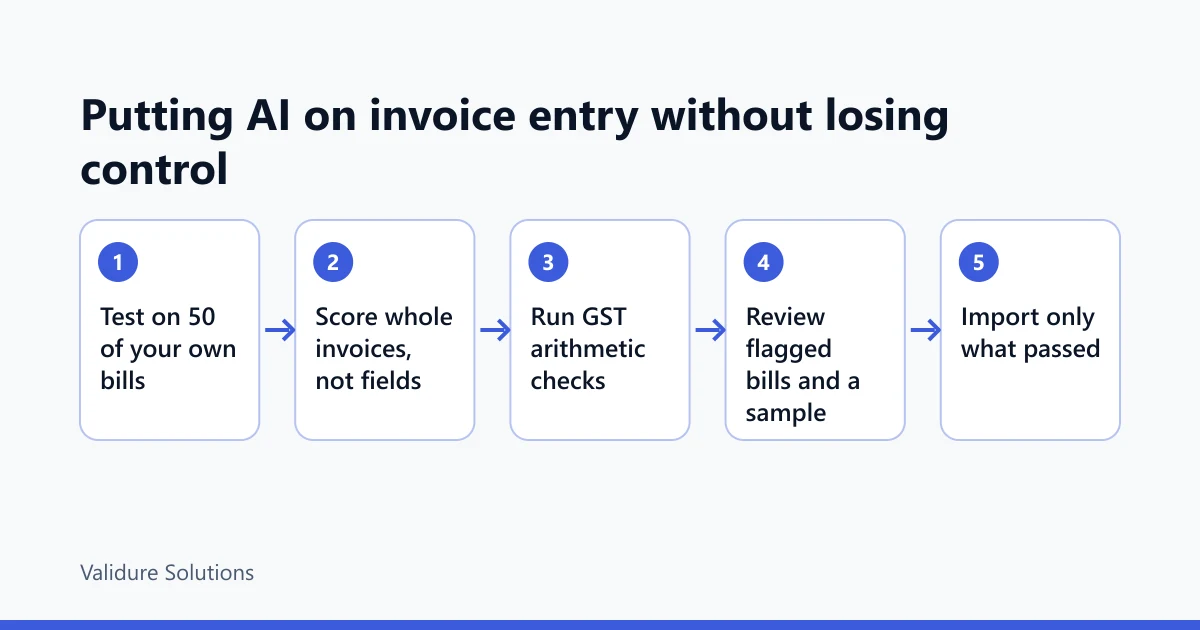
For a business at the volume above, we'd run it in this order. Test on 50 bills. If invoice accuracy after checks looks workable, extract into a sheet with one row per bill and a column per check, never straight into the books. Review flagged rows and the sample. Then import the passed rows.
That last step is where your accounting system matters. In Validure ERP, bills extracted to a sheet come in through the Excel and CSV import into purchases, so the input tax credit and the GSTR-3B summary are built from the same records. The audit trail then shows who imported and who changed each entry, which is what you want when a month later someone asks why a bill was booked the way it was.
And you might not need any of it. If most of your bills come from a handful of large suppliers, asking them for e-invoice files may get you further than any AI tool. If you get 80 bills a month, a person keying them is still the simplest system there is.
Sources and checks
Verify rules and thresholds against the official sources before relying on them: the GST portal for taxpayer search and returns, the e-invoice portal for e-invoicing rules, its FAQs and the signed QR verifier, CBIC for the CGST Act and Rules (Rule 46 lists what a tax invoice must contain), and MeitY for the Digital Personal Data Protection Act and Rules. Model prices are from the provider's published pricing at the time of writing and change often. The test results, timings and token counts are examples to show the method, not measurements of any product.
Frequently asked questions
How accurate is AI at reading invoices?
On clean, printed bills from regular suppliers, usually very accurate field by field. The figure that matters is how many whole invoices come out with no errors, which is always lower. Measure it on 50 of your own bills before deciding.
Which invoice fields does AI get wrong most often?
In practice, dates on photographed bills (day and month swapped), long line-item tables, multi-page bills and handwritten bills. Your own test will tell you which fields and which suppliers fail for you.
Can I post AI-extracted invoices straight into my books?
Not without checks. Run the GST arithmetic checks on every bill, have a person look at the flagged ones and a sample of the rest, and import only what passed.
Is it expensive to use an AI model for this?
The model usually costs a few dollars a month for hundreds of bills at current small-model prices. The real cost is the review time, so design the review first.
Do I need AI for e-invoices?
No. E-invoices carry a signed QR code with the key header fields. Scan the QR or ask the supplier for the e-invoice file instead.
Is it safe to upload supplier bills to an AI service?
It depends on the provider's terms. Check whether uploads are used for training and how long they're kept, prefer business or API plans that exclude training, and take advice on your data protection obligations.
