
From spreadsheets to an ERP: when to switch, and how to move without losing a rupee
By Validure team · · 18 min read
A migration guide for small Indian businesses. Measurable signs it is time, a cost-of-errors model, data cleaning rules, a trial balance check for opening balances, idempotent CSV imports, a one-month parallel run, a cutover calendar around GST dates, and a rollback plan.

Say a trading company with eleven staff keeps its books in four workbooks: sales, purchases, stock and "accounts". On the 8th of the month the accountant is still matching the stock sheet to purchase bills. On the 10th the owner asks what a large customer owes and gets two answers, 4,15,000 from sales and 3,60,000 from accounts, because a part payment went into one file only. On the 11th the GSTR-1 is due and nobody wants to touch the formulas.
Nothing there is a spreadsheet bug. A spreadsheet is a fine tool until the same fact lives in more than one place.
This post is a migration guide for that company. It covers how to tell it's time with numbers instead of a feeling, what to move first and why, how to clean the data, how to prove the opening balances loaded correctly, how to design an import you can re-run safely, and how to cut over around GST dates with a way back. It's written for the person who will actually do the move.
Signs it is time, with thresholds
"It feels messy" is not a reason you can defend to a partner. These are measurable. The thresholds are our rules of thumb, not standards, so adjust them to your business.
| Signal | How to measure | Worth acting at |
|---|---|---|
| Month-end close | Working days from month end to a closed, reconciled set of books | More than 5 days |
| Correction rate | Invoices or bills that needed a fix after issue, divided by total | More than 1 in 100 |
| Duplicate truth | Files that hold the same fact (customer balance, stock) | More than 1 |
| Time to answer | Minutes to say what a named customer owes right now | More than 10 |
| Stock drift | Physical count against sheet, by value | More than 2 per cent |
| Key-person risk | People who can run the GST workings alone | 1 |
Two or three of these in the red is a case. One in the red usually isn't.
A simple cost-of-errors model
Take the same company as an example, with an assumed loaded staff cost of 300 an hour. Monthly figures:
Of 400 invoices, 2 per cent need correction: 8 errors x 45 minutes = 6 hours, so 6 x 300 = 1,800. Closing takes 3 working days longer than it would with one source of truth: 3 x 8 hours x 300 = 7,200. One dispatch a month goes unbilled, invoice value 18,000, margin 15 per cent, so 2,700 of margin is lost.
Total: 1,800 + 7,200 + 2,700 = 11,700 a month, or 1,40,400 a year.
Now the cost of moving. Suppose the migration takes 10 working days of someone's time (10 x 8 x 300 = 24,000) plus 8 extra days during the parallel month (8 x 8 x 300 = 19,200). One-time cost: 43,200.
With a subscription of S a month, payback is 43,200 / (11,700 - S). If S is 3,000, that's 43,200 / 8,700, about five months. The 3,000 is a placeholder, not a price. Put in your own numbers. If the monthly cost of errors is under what the system costs, stay on sheets, and be honest about that.
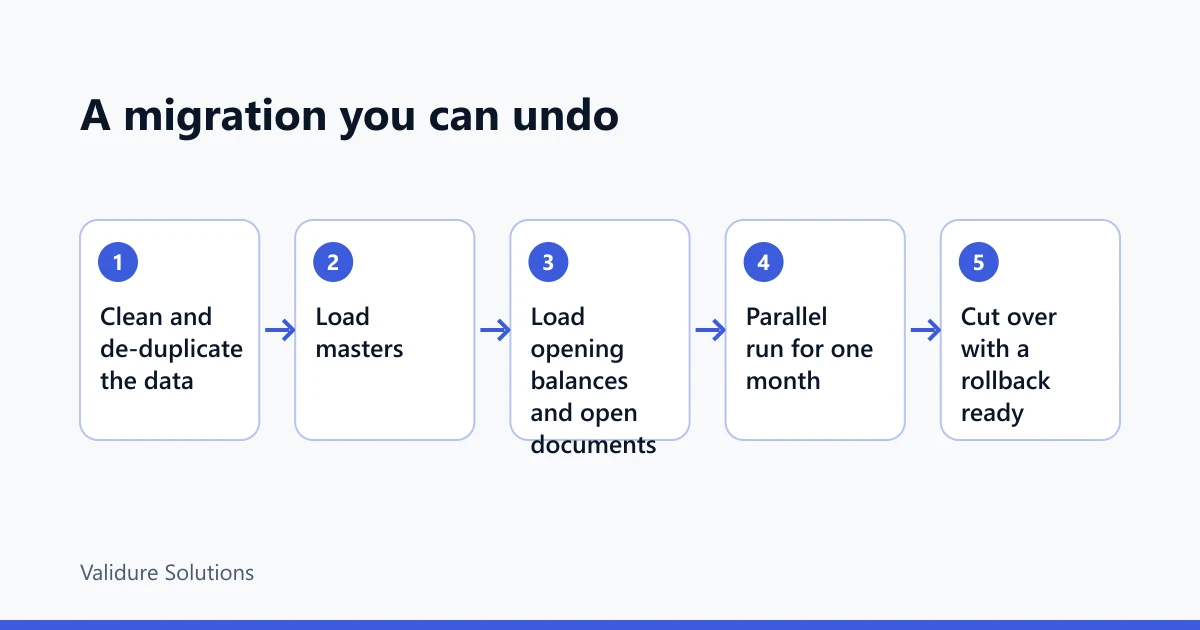
What moves first, and why
Order matters because later steps depend on earlier ones.
- Masters. Parties (customers and suppliers), items, units, tax codes, chart of accounts. Everything else refers to these.
- Opening balances. Ledger balances as at a single cutover date, plus stock quantities and values.
- Open documents. Unpaid sales invoices, unpaid purchase bills, advances. These make the debtors and creditors totals explainable per customer.
Don't load history. Closed transactions from past years belong in an archived export. Loading two years of invoices multiplies the cleaning work and adds nothing to today's decisions. Keep the old files read-only and reachable.
One subtle point about open documents: their GST was already reported in your old returns. Import them as opening outstanding, not as new sales. If they post tax again, your first GST summary from the new system will double count.
Clean the data before it moves
An ERP loads what you give it, faithfully. Four things go wrong most often.
Duplicate parties
"Sharma Traders", "SHARMA TRADERS.", "Sharma Trdrs Pvt" and "M/s Sharma Traders" may be one customer or four. Normalise names into a matching key before comparing:
key(name):
  upper-case
  remove punctuation and "M/S"
  collapse spaces
  drop trailing tokens: PVT, LTD, LLP, CO, AND
  -> "SHARMA TRADERS"
Group by GSTIN first, then by key for parties without one. Where two rows share a GSTIN, merge them. Where two share a name but have different GSTINs, don't merge automatically: the same business registered in two states has two GSTINs, and place of supply differs, so they're separate parties for tax purposes. The PAN is characters 3 to 12 of the GSTIN, so rows with the same PAN and different state codes are the same legal entity with different registrations.
GSTIN validation, including the checksum
A GSTIN has 15 characters: a 2-digit state code, the 10-character PAN, an entity number, the letter Z, and a check character. A format test catches most typos:
^[0-9]{2}[A-Z]{5}[0-9]{4}[A-Z][1-9A-Z]Z[0-9A-Z]$
The last character adds a second test. It is computed from the first 14. Map 0 to 9 to the values 0 to 9 and A to Z to 10 to 35. Multiply each value by 1 or 2, alternating, starting with 1. Split each product into quotient and remainder by 36, add the two, and sum across all 14 characters. The check character is the one whose value is (36 - sum mod 36) mod 36.
C = "0123456789ABCDEFGHIJKLMNOPQRSTUVWXYZ"
def check_char(g14):
    s = 0
    for i, ch in enumerate(g14):
        p = C.index(ch) * (1 if i % 2 == 0 else 2)
        s += p // 36 + p % 36
    return C[(36 - s % 36) % 36]

assert check_char("27AABCU9603R1Z") == "N"   # 27AABCU9603R1ZN, a published example
Worked case on a made-up number, 29ABCDE1234F1Z?: the 14 per-character totals are 2, 18, 10, 22, 12, 26, 14, 2, 2, 6, 4, 30, 1 and 35, which sum to 184. 184 mod 36 is 4, and 36 - 4 = 32, which is the letter W. So the number would be 29ABCDE1234F1ZW.
Two honest caveats. Published descriptions of this checksum differ in wording (some call it Luhn mod 36), and we couldn't find the official specification, so test your implementation against real GSTINs from your own master before trusting it. And a passing checksum only says the number is well formed. Whether the registration is active is a separate lookup on the GST portal.
Item naming
"Cotton Tee M Blk", "T-shirt cotton black medium" and "TSHIRT-BLK-M" are one product. Pick a pattern, such as <product> <variant> <size>, give every item a short permanent code, and keep the old names in an "alias" column so you can trace them. Give each item its tax classification (HSN for goods, SAC for services) at this stage. The digit length you're required to show depends on turnover, so check the current notification.
Units
Units cause the quietest, most expensive errors. Say you hold 40 boxes of 12 pieces, bought at 1,440 a box.
| Loaded as | Quantity | Rate | Value |
|---|---|---|---|
| Boxes (correct) | 40 | 1,440 | 57,600 |
| Pieces, converted | 480 | 120 | 57,600 |
| Pieces, quantity not converted | 40 | 120 | 4,800 |
The third row understates stock by 52,800 and the system will show shortages that don't exist. Fix one base unit per item, store the conversion factor (1 box = 12 pieces), and map every spelling (Nos, NOS, no., pcs, Pcs) to one code.
The trial balance check
This is the check that tells you opening balances loaded correctly. It has three parts: debits equal credits, each control account equals the sum of its open documents, and the new system's opening figure equals the old system's closing figure.
An example, as at 30 November 2026:
| Account | Debit | Credit |
|---|---|---|
| Cash | 85,000 | |
| Bank | 4,20,000 | |
| Debtors | 6,50,000 | |
| Stock | 9,00,000 | |
| Fixed assets | 5,00,000 | |
| GST input credit | 60,000 | |
| Creditors | 5,40,000 | |
| GST payable | 1,10,000 | |
| Loan | 4,00,000 | |
| Capital and reserves | 15,65,000 | |
| Total | 26,15,000 | 26,15,000 |
Debits: 85,000 + 4,20,000 + 6,50,000 + 9,00,000 + 5,00,000 + 60,000 = 26,15,000. Credits: 5,40,000 + 1,10,000 + 4,00,000 + 15,65,000 = 26,15,000.
Two warnings. Capital is the balancing figure when you migrate, so a matching total proves very little by itself. And many systems will park any difference in a suspense or "opening difference" account so the load succeeds. Treat a non-zero suspense account as a failed load, and don't clear it with a journal until you know where it came from.
The real test is the sub-ledger check:
SELECT a.code,
       a.opening_balance                          AS control,
       COALESCE(SUM(d.outstanding), 0)            AS subledger,
       a.opening_balance - COALESCE(SUM(d.outstanding), 0) AS diff
FROM   accounts a
LEFT   JOIN open_documents d ON d.control_account = a.code
WHERE  a.is_control
GROUP  BY a.code, a.opening_balance
HAVING a.opening_balance <> COALESCE(SUM(d.outstanding), 0);
An empty result is a pass. Now say one debtor row was rejected as a duplicate: debtors load as 6,32,000 instead of 6,50,000. The trial balance is out by 18,000 (credits higher) and the query above shows the debtors account with a control of 6,50,000 against a sub-ledger of 6,32,000. You look for the customer whose open invoices total 18,000. Without the query you'd be hunting through 26 lakh.
Open documents should be checked per party too. If a customer has invoices of 40,000, 55,000 and 30,000 open, the party balance is 1,25,000, and the 55,000 is the outstanding part of an 80,000 invoice after a 25,000 part payment. Load the outstanding amount and keep the original invoice number and date. A later receipt or credit note then has something to attach to.
Design the import so it can be re-run
You'll run the import several times: once to find the errors, again after fixing them, again on the cutover day with fresh data. An import is safe if running it twice gives the same result as running it once. That's idempotence, and it comes from four decisions.
Keys
Every row needs a stable natural key that survives the re-run:
| Entity | Key |
|---|---|
| Party | GSTIN, or a party code you assign during cleaning |
| Item | Item code |
| Open invoice | Party key + invoice number + financial year |
| Opening balance | Account code + as-at date |
The invoice key matches how GST works: the invoice number must be unique within a financial year, and Rule 46 of the CGST Rules caps it at 16 characters. A number such as INV/2026-27/0232 is exactly 16. Count the slashes. If your sheet used up to INV-0231 this year, start the new series at 0232 so nothing repeats in the same year. Sources differ on whether the counter must reset each April, so check the rule text or your adviser, but uniqueness within the year is not optional.
Staging, then apply
Load the raw file into a staging table with the batch id and row number. Validate there. Apply to real tables only from clean rows.
INSERT INTO parties (gstin, name, state_code, src_hash)
SELECT gstin, name, state_code, src_hash
FROM   stg_parties
WHERE  batch_id = :batch AND NOT has_error
ON CONFLICT (gstin) DO UPDATE
   SET name = EXCLUDED.name,
       state_code = EXCLUDED.state_code,
       src_hash = EXCLUDED.src_hash
 WHERE parties.src_hash IS DISTINCT FROM EXCLUDED.src_hash;
The hash of the row's values means an unchanged row does nothing. The test for the whole design is simple: run the same file twice, and the second run must report 0 inserted and 0 updated.
Dry run
Run every validation and report what would happen (counts of inserts, updates and unchanged rows, and the errors) without writing anything. For opening balances, commit only if there are zero errors. For masters, you can accept the valid rows and fix the rest.
An error report you can act on
One row per problem, as a file the person fixing the sheet can sort:
| Row | Column | Value | Rule | Message |
|---|---|---|---|---|
| 42 | gstin | 27AABCU9603R1ZM | checksum | check character should be N |
| 57 | unit | Nos. | unit_map | no mapping, add alias |
| 88 | date | 03/04/2026 | ambiguous_date | day-first or month-first? |
"Failed on row 42" with no column is a bad error report. Validure ERP imports from Excel and CSV, and whichever system you pick, ask whether it has a dry run, a per-row error file and a safe re-run. Those three matter more than the import button.
Run both for one month
The parallel run is where you prove the new system matches the old, line by line, and not just on totals. Pick a full calendar month so month-end and GST workings are exercised. Enter every transaction in both. Yes, it's double work, and it's the cheapest insurance you'll buy.
Compare at three levels. First totals, then totals by party, then line by line on the document key. The line-by-line step is a full outer join:
SELECT COALESCE(o.invoice_key, n.invoice_key) AS invoice_key,
       o.taxable AS old_taxable, n.taxable AS new_taxable,
       COALESCE(o.taxable, 0) - COALESCE(n.taxable, 0) AS diff
FROM   old_sales o
FULL   JOIN new_sales n ON n.invoice_key = o.invoice_key
WHERE  o.taxable IS DISTINCT FROM n.taxable;
You get three kinds of row: only in old, only in new, in both with different amounts. Each needs an explanation written next to it.
An example December. Old taxable sales are 38,42,500 and new are 38,40,000, a difference of 2,500. The join returns one row: a cash sale of 2,500 entered in the sheet and never in the new system (only in old). At a single 18 per cent rate, the output tax difference is 6,91,650 - 6,91,200 = 450, which is 18 per cent of 2,500, so tax and value agree on the one missing row and nothing else. Differences of a few paise on individual invoices are a rounding policy question (per line or per invoice), which you decide once and apply everywhere.
Pick a rule and write it down: the cutover goes ahead only if every difference is explained and none is a calculation difference you can't account for. Compare the GST workings too. Validure ERP produces GSTR-1 and GSTR-3B summaries, and the useful comparison is those summaries against the figures you'd file from the sheets, plus the input tax credit against the GSTR-2B statement. GSTR-2B is generally generated around the 14th for the previous month, and credit in GSTR-3B is limited to what it shows. Dates and rules change, so confirm on the GST portal.
The cutover calendar
Cut over at a month boundary, after returns for the previous month are well in hand. Monthly filers' GSTR-1 is generally due on the 11th and GSTR-3B on the 20th of the following month. QRMP filers and notified extensions have other dates, so check yours. This calendar is an example for a go-live on 1 December 2026, with balances as at 30 November.
| When | What |
|---|---|
| 15 to 30 Nov | Clean data, freeze masters, run dry-run imports |
| Mon 30 Nov | Take a read-only copy of every sheet. This is your rollback point |
| 1 to 5 Dec | Close November in the sheets; produce the final trial balance |
| Mon 7 Dec | Load masters, opening balances and open documents; run the trial balance and sub-ledger checks |
| Fri 11 Dec | File November GSTR-1 from the old books |
| 1 to 31 Dec | Parallel run; compare weekly, not just at the end |
| Fri 18 Dec | File November GSTR-3B from the old books. The 20th is a Sunday this year, but don't wait for the last day |
| Fri 8 Jan | Compare December in full. Go or no-go |
| Mon 11 Jan, Wed 20 Jan | File December returns from the new system, if go |
The first return filed from the ERP is December's. November stays on the old books, which keeps the first filing free of load errors. If your year-end audit is near, consider April instead: a clean financial-year start avoids splitting a year across two systems.
Rollback
Decide it before you start, in writing, while nobody is under pressure.
Rollback needs a snapshot (the read-only sheets from 30 November), a trigger (any unexplained difference in the trial balance, taxable value or tax at the go or no-go meeting, or a return that can't be produced), and a deadline. The deadline matters because rollback gets more expensive each day. During the parallel month it costs nothing: you carry on with the sheets. After you switch the sheets off it means re-keying every transaction since cutover. Keep the sheets updatable for the first 10 working days after go-live, and take a daily export from the new system. Ten days is our judgement, so set it by how many invoices you issue.
What typically goes wrong
- Dates stored as text, or read as month-first when they are day-first. 03/04/2026 is 3 April in India and 4 March elsewhere.
- Excel quietly dropping leading zeros, so a state code 09 becomes 9, or a PIN code or item code loses its start. Format as text before pasting.
- Long numbers turning into scientific notation, such as phone numbers and bank account numbers.
- Totals rows, merged cells and hidden rows inside the data range. Export values to a flat CSV with one header row.
- Dr and Cr in one column with brackets for negatives. Decide the sign convention and convert once.
- Customer advances held as negative debtors, which then hide real overdue amounts.
- Cut-off errors: an invoice dated 30 November keyed on 2 December, in neither period.
- Opening stock with no rate, giving a quantity but zero value, so the stock account won't agree with the ledger.
- Nobody owns the migration. Name one person who can say "not yet".
When not to bother
If you issue a few dozen invoices a month, have one person doing all the entries and keep one file, a tidy sheet and the checks above will do. The case for a system gets stronger with transaction volume, with more than one person entering, with stock, and with GST filings that depend on matching purchase credit.
Sources and checks
Rates, due dates and rules change, so verify against the official sources before relying on any figure here: the GST portal for returns, due dates, GSTIN lookup and advisories, and the CBIC GST site for the CGST Act and Rules. For the GSTIN check-character method and the GSTR-2B timing, we relied on secondary sources that agree with each other but are not official, so test and confirm. All amounts in the examples are made up for illustration and are not advice. Check accounting treatment with your accountant.
Frequently asked questions
How do I know it's time to move from Excel to an ERP?
Measure it. If month-end close takes more than about five working days, more than 1 in 100 invoices needs a fix, or two files hold the same customer balance, errors are probably costing more than a system would. One signal alone usually isn't enough.
What should I import first?
Masters first (parties, items, units, tax codes), then opening balances, then open invoices and bills. Don't import closed history. Keep it as a read-only archive.
How do I prove my opening balances are right?
Check that debits equal credits, that each control account such as debtors equals the sum of its open documents, and that the new opening figure equals the old closing figure. Treat any balance sitting in a suspense account as a failed load.
Can I import from Excel or CSV safely?
Yes, if you import into a staging area, validate, run a dry run and key each row so a second run changes nothing. Always clean the file first, because an import loads mistakes just as faithfully as good data.
How long should the parallel run last?
One full month, so month-end and a GST cycle are both exercised. Shorter runs miss problems that only show at closing.
When is the best time to cut over?
At the start of a month, after the previous month's returns are filed or well in hand, and ideally not in the days around the 11th and 20th. Starting a new financial year in April is the cleanest if timing allows.
