
The GST signatory has left and the OTPs still go to their phone. How to take the login back
By Validure team · · 14 min read
What to do when the person registered as primary authorised signatory on the GST portal has resigned, died or stopped answering. The self-service route if you still have the password, the tax officer route if you don't, the DSC step that trips companies, and what a late return costs while you wait.

Say your accounts manager resigned on the 3rd. She was the primary authorised signatory on the company's GST registration, so the portal has her mobile number and her email. On the 18th someone sits down to file GSTR-3B, types the password from the shared sheet, and finds it was changed months ago. The "forgot password" link sends an OTP to a phone that now belongs to someone who has moved on. The return is due on the 20th.
This happens because the GST registration was filled in once, years ago, by whoever was handy that week, sometimes a consultant using their own number.
There are two ways out, and which one you take depends on a single question: can anyone in the business still log in? This post walks through both, the digital signature step that catches companies out, the new OTP check that started on 1 November 2026, and what a few days of delay costs. It's general information about the portal process, not legal advice; your tax practitioner or the jurisdictional officer has the last word on your case.
First, work out what you still have
Before you call anyone, sit down for ten minutes and list what you actually control. The GST login belongs to the GSTIN, not to a person. One username and password for the business, with the primary authorised signatory's mobile and email attached to it for OTPs and alerts. So the question isn't "who was the signatory", it's "which of these keys do we hold today".
| What you still have | Route | Rough time |
|---|---|---|
| Working username and password | Self-service non-core amendment on the portal | Same day, if the new signatory can sign |
| Password lost, but the departing person cooperates | Ask them to reset it once with their OTP, then self-service | A day or two |
| Password lost, person unreachable, deceased or hostile | Jurisdictional tax officer resets access | Depends on the office; plan for a week or more |
| Login works, but the company has no valid DSC for anyone | Get a DSC for the new signatory first, then self-service | Usually a few days for the DSC |
If the person has left on good terms, the second row is the cheapest. One phone call, one OTP read out, a new password set, and you're on the first row.
Route 1: you can still log in
This is a non-core amendment. Non-core fields don't need a tax officer's approval; the portal updates them once the application is validated. The steps, from the GST portal's own user manual for non-core amendments:
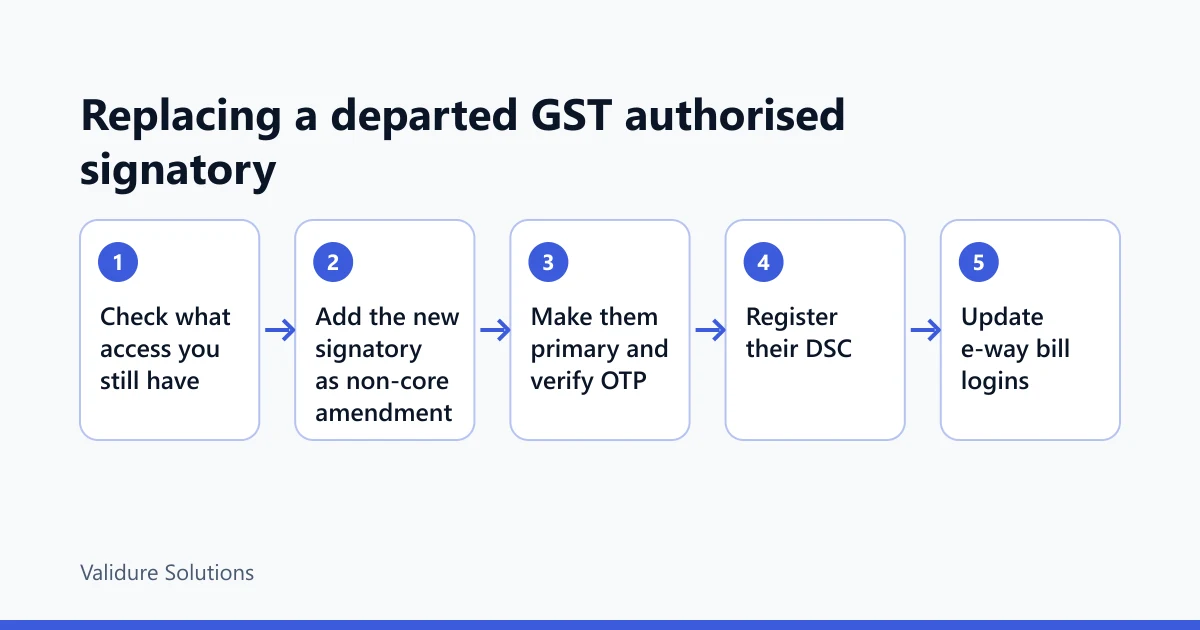
- Log in and go to Services, then Registration, then Amendment of Registration Non-Core Fields.
- Open the Authorised Signatory tab and click Add New. Enter the new person's details: name, PAN, mobile, email, and proof of their appointment. For a company that's usually a board resolution; for a firm, a letter of authorisation signed by the partners.
- The portal checks that the PAN, mobile and email aren't already used by another signatory or partner on the same registration. If the new person's number was ever entered against the old signatory, fix that first.
- Submit through the Verification tab, signed with DSC or EVC.
- Once that's through, open the amendment again, untick the old person as primary, and tick the new one. The portal won't let you remove the primary signatory until another one is marked primary, so this is always a two-step dance.
- When the primary signatory's mobile or email changes, the portal sends an OTP to the new contact details. The manual says one common OTP goes to both, and it's valid for 10 minutes. Have the new person sitting next to you, phone in hand.
Practitioner guides say to wait about 15 minutes between the first submission and making the new person primary. That isn't in the official manual, but it costs nothing to wait.
The OTP check that started on 1 November 2026
The registration amendment process changed from 1 November 2026, following Notification No. 05/2026-Central Tax, which substituted parts of Rule 19 of the CGST Rules. Tax news sites report GSTN's advisory on it in consistent terms; I couldn't open the advisory itself on the portal, so read what follows as reported, and check the portal's news page before relying on it.
As reported, after you submit an amendment, the mobile and email of the primary authorised signatory and of one selected promoter, partner, director, Karta, member or trustee must be verified by OTP. There's a separate page for it under Services, then Registration, then OTP verification of GSTIN. You get 3 days from submission. If verification isn't done in that window, the application reference number isn't generated, which in practice means the amendment didn't happen and you start again.
So for a company, you need two people on hand within those three days: the new signatory and a director. If the director you pick is travelling, pick another one. The same reports say most changes other than the principal place of business now take effect on submission and online validation, so once the OTPs are done you shouldn't be waiting on an officer.
Who has to sign, and why companies get stuck
Here's the step that turns a ten-minute job into a week. Companies and LLPs sign GST applications with a digital signature certificate, not EVC. The portal accepts Class 2 and Class 3 certificates, and since Class 2 certificates are no longer issued in India, a new one will be Class 3. Partnership firms and proprietors can use EVC, which is an OTP to the signatory's registered mobile.
If the only registered DSC on the portal belongs to the person who left, you can't use it, and you shouldn't try. A DSC is personal to its holder; using someone else's dongle with their PIN is the kind of thing that's very hard to explain later. Get a DSC issued in the new signatory's name first. Then, once they're on the registration, register it on the portal: My Profile, then Register/Update DSC, choose their PAN from the drop-down, and sign through the emSigner utility. If their PAN doesn't appear in that drop-down, they aren't on the registration yet, and you've done the steps in the wrong order.
The order that works for a company:
| Step | Who | What can go wrong |
|---|---|---|
| Board resolution naming the new signatory | Board | Missing date or signature; the officer route will ask for it too |
| DSC issued in the new signatory's name | New signatory | Takes a few days; start this on day one |
| Non-core amendment adding them, signed with an existing valid DSC | Anyone who can sign now | No valid DSC on the portal at all: you may need the officer route |
| Make them primary, OTP to their phone and email | New signatory | OTP expires in 10 minutes |
| OTP verification of GSTIN within 3 days | New signatory and one director | Director unavailable, ARN never generated |
| Register their DSC on the portal | New signatory | PAN not in the drop-down means step 3 isn't done |

Route 2: nobody can log in
If the password is gone and the OTPs go to someone you can't reach, the portal has no self-service way back. The GST portal's FAQ is plain about it: where the primary authorised signatory has died or can't be traced, you approach your jurisdictional tax officer to get the password and to set a new authorised signatory.
The process goes back to a June 2018 government press release, issued after taxpayers complained that the agents who registered them had used the agents' own email and mobile numbers. In outline:
- You find your jurisdiction. It's printed on the registration certificate, and it also shows under My Profile on the dashboard, which helps only if you can still log in. If you can't, the certificate copy in your files is the place to look.
- You go to the officer with a written request on letterhead, proof of identity of the person asking, and documents showing they're a stakeholder or authorised signatory of the business. For a company, bring the board resolution and the director's ID. For a death, the death certificate.
- The officer checks that the person is listed against the GSTIN, uploads the proof in the back office, and enters the new email and mobile number.
- The username and a temporary password go to the new email. You log in through the first-time login link and set your own password.
The FAQ also says the officer can add an authorised signatory and can mark an existing promoter or partner as primary after authentication. So if a director is already on the registration, the fastest request is "please make this director the primary signatory with these contact details", not "please add a brand-new person". You can add the new accounts manager yourself afterwards, through Route 1.
How long this takes depends entirely on the office. Go in person if you can, with copies of everything, and ask what else they need before you leave.
What the wait costs
The return deadline doesn't move because your login broke. For a monthly filer, GSTR-1 is due on the 11th and GSTR-3B on the 20th, so a signatory who leaves in the first week can cost you both.
Two charges apply to a late GSTR-3B. A late fee under section 47 of the CGST Act, reported by practitioners as ₹50 a day (₹25 CGST plus ₹25 SGST), or ₹20 a day for a nil return, capped at an amount that depends on turnover. And interest under section 50 at 18 per cent a year on the tax paid late in cash, after input tax credit is set off.
Example, with made-up figures: say your October GSTR-3B shows ₹2,40,000 payable in cash after credit, and you file 12 days late.
- Interest: ₹2,40,000 × 18% × 12 ÷ 365. That's ₹43,200 a year, or about ₹118.36 a day, so ₹1,420 for 12 days.
- Late fee: 12 days × ₹50 = ₹600, below every turnover cap I found.
- Total: ₹2,020, paid in cash.
That's annoying but not ruinous. The bigger cost is downstream. Your customers can't see the invoices in their own credit statements until GSTR-1 is filed, and the ones who check will ring you. Don't let a lockout run into a second month; each return you miss adds its own fee and interest, and makes the catch-up harder. If the officer route will clearly take longer than the due date, prepare the return figures anyway so filing takes minutes once you're back in.
The other logins that use the same number
Fixing the GST portal isn't the end of it. The e-way bill and e-invoice systems run separately, and since 1 April 2025 they've required two-factor login for all taxpayers: a password plus an OTP. Their FAQ says they pull your contact details from the GST portal, and if they show the old mobile you use the option to update your GSTIN details from the common portal. Each sub-user on those systems has their own registered mobile, so check whether the person who left was also the main e-way bill user, and if they were, move that too.
While you're at it, change the GST password itself. Everyone who ever had it in a spreadsheet still has it. Then check the income tax portal and the bank's corporate login for the same named contact.
Stop it happening next time
Most of this pain comes from one person being the only route in. A few habits fix that, and none of them needs software:
| Check | What to look for | What a hit means |
|---|---|---|
| Who is primary authorised signatory | Name on the registration certificate | If it's an employee who might leave, add a director or partner as a second signatory now |
| Whose mobile and email are on file | My Profile and the registration details | A consultant's or personal number is a lockout waiting to happen |
| Where the password lives | A password manager or sealed record two people can open | A single person's memory is the risk |
| Whose DSCs are registered | Register/Update DSC page | Only one valid DSC, or one expiring soon, means you can't sign if that person goes |
| Exit checklist | Does it include GST, e-way bill, e-invoice and DSC handover? | If not, add it before the next resignation |
Use a role-based email address for the registration where you can (an accounts@ mailbox the company controls), and a mobile number the company owns. A person's number leaves with the person. A company SIM in a drawer doesn't.
It also helps if the return figures don't live on the departing person's laptop. Validure ERP keeps purchases, sales and input tax credit in one place with GSTR-1 and GSTR-3B summaries, so whoever takes over can see what's due and file once access is back, without reverse-engineering last month's spreadsheet. Its full audit trail also shows who entered what before they left. If you file a handful of invoices a month through a practitioner, you don't need a system for this; you need the practitioner to have a second contact at your end.
Sources and checks
I checked these on 13 November 2026; check them against the official pages before relying on them. The non-core amendment steps, the OTP behaviour and the 10-minute OTP validity are from the GST portal's user manual at tutorial.gst.gov.in, along with the Register/Update DSC steps and the FAQ on a primary signatory who has died or can't be traced. The tax officer reset process was announced by the government in June 2018 through the Press Information Bureau. The 1 November 2026 changes and the 3-day OTP verification come from GSTN's advisory as reported by several tax news sites; I couldn't open the advisory itself, so confirm it on the GST portal news page. Notification No. 05/2026-Central Tax, Rule 19 and Rule 26 of the CGST Rules, and sections 47 and 50 of the CGST Act are on the CBIC site. The late fee rates and turnover caps came from practitioner sites, which didn't agree on the caps, so I've used only the per-day rate. The e-way bill and e-invoice update option is in the e-way bill system FAQ, and the two-factor login dates are in NIC's advisory on ewaybillgst.gov.in. All figures in the example are illustrations.
Frequently asked questions
Can I change the GST authorised signatory without the old signatory's OTP?
Yes, if you still have the username and password. Adding a signatory and changing the primary one is a non-core amendment, and the OTP goes to the new signatory's mobile and email. If you've lost the password too, you'll need the jurisdictional tax officer.
Does changing the authorised signatory need a tax officer's approval?
Not normally. It's a non-core field, so the portal updates it once the application is signed and the OTP verification is complete. The officer only comes in when nobody can log in.
Can we use the old director's DSC to sign the change?
Don't. A DSC belongs to the person it was issued to. Get one for the new signatory, or sign with another current director's DSC that's already registered on the portal.
How long does the jurisdictional officer take to reset access?
It varies by office. Take a written request, ID, proof that the person is a stakeholder or signatory, and the board resolution or death certificate where it applies, so you don't have to come back.
What happens if we miss the OTP verification window?
As reported, if the OTP verification isn't done within 3 days of submitting, the ARN isn't generated and the amendment doesn't go through. You submit it again.
Will the e-way bill portal pick up the new mobile number by itself?
Not always. Use the option to update your GSTIN details from the common portal after the GST amendment goes through, and check any sub-users separately.
