
Your staff are pasting customer data into free AI chatbots. What a small firm can actually do
By Validure team · · 15 min read
Staff use personal ChatGPT and Gemini accounts for work, and paste customer and employee details into them. What happens to that data on each kind of account, what the DPDP Act changes, why a ban usually fails, the cost of a business plan worked out, a one-page rule and the checks that show whether it is working.

Say a 30-person distribution firm in Pune. The accounts executive has a supplier dispute and wants a firm but polite email, so she pastes the whole thread into the free chatbot on her phone, customer name, GSTIN, outstanding amount and all. The HR coordinator asks the same app to tidy up a warning letter, with the employee's name, salary and the reason for the warning in it. Neither of them thinks twice. The tool is free, it's quick and the email it wrote was good.
Nobody told them not to. Nobody told them they could, either. That gap is the real problem.
This post is for the owner or office manager who wants to close that gap without a ban nobody follows. It covers what happens to pasted data on each kind of account, what Indian law adds, the cost, a one-page rule and the checks.
Our interest: we build business software and use AI tools ourselves. We don't sell AI subscriptions or monitoring software. This is information, not legal advice; if you handle health, financial or children's data, get advice for your sector.
What happens to the data depends on the account, not the app
The same chatbot behaves very differently depending on who owns the account. Here is what the providers' own help pages say, as checked in November 2026. Settings and terms change, so recheck before you write your rule.
On OpenAI's personal plans (Free, Plus and Pro), the setting called "Improve the model for everyone" is on by default, and OpenAI says it may use content from those plans to train its models. A user can switch it off under Settings, Data controls. Temporary Chats aren't used for training and, per OpenAI's help centre, are deleted after 30 days. On ChatGPT Business, Enterprise and the API, OpenAI says it doesn't train on inputs or outputs by default, and it offers a data processing addendum to business customers.
Google's Gemini Apps Privacy Hub says some chats are reviewed by human reviewers, including reviewers from its service providers, when the Keep Activity setting is on, and that setting is on by default for adults. Reviewed chats are kept for up to three years, disconnected from the account, and aren't deleted when the user deletes their activity. Google's own advice on that page is not to enter anything confidential you wouldn't want a reviewer to see. For users on a qualifying Google Workspace edition, Google says content isn't human-reviewed or used for model training outside the domain without permission.
| Where the paste goes | Used to train models? | Who can see it | Contract with your company? |
|---|---|---|---|
| Free or personal plan, default settings | Yes, by default, on both providers above | Provider staff and reviewers in some cases | No |
| Personal plan, training switched off | No, per the provider | Kept for abuse checks for a period | No |
| Temporary or incognito-style chat | No, per the provider | Kept for up to about 30 days (OpenAI) or 72 hours (Gemini) for safety | No |
| Company business workspace | No by default, per the provider | Your admin and the provider under its business terms | Yes, business terms and a DPA |
| API inside your own software | No by default, per the provider | Retention set by the API terms | Yes |
Look at the last column. Switching training off fixes one thing, the model-training use. It doesn't make the account yours. The data still sits in a personal account that you can't see, can't delete and can't recover when the employee leaves. That's why "just tell everyone to turn off training" is a weak answer, even though it's better than nothing.
What the DPDP Act adds (established, as of November 2026)
The Digital Personal Data Protection Act, 2023 applies when the paste contains personal data: a customer's name and phone number, an employee's salary, someone's PAN. A supplier's company name and an invoice total often aren't personal data. A warning letter is almost entirely personal data.
Three parts of section 8 matter here.
- Section 8(1) makes your business, as the data fiduciary, responsible for complying with the Act for processing done by it or on its behalf by a data processor, "irrespective of any agreement to the contrary".
- Section 8(2) says you may use a data processor to process personal data on your behalf only under a valid contract.
- Section 8(5) requires reasonable security safeguards to prevent a personal data breach. The Schedule to the Act sets the highest penalty band, up to 250 crore rupees, for failing that duty.
Now put the warning letter into that frame. The employee was doing company work, with company data, through a provider your company has no contract with. Our reading, labelled as such: that's hard to square with section 8(2), and it's the kind of gap section 8(5) is about. A business workspace with a data processing addendum is at least a contract you can point to.
On timing: the DPDP Rules, 2025 were notified on 13 November 2025, announced by PIB the next day, with most duties on businesses coming in after an 18-month phase, so around May 2027. Check the official commencement notification for the exact dates. That gives a small firm time, but not so much that a habit formed now will be easy to break later.
Why a ban usually fails
A ban is the obvious first move. For a small firm it has three problems.
First, you can't enforce it. Blocking chatbot websites on the office Wi-Fi does nothing about the phone in someone's pocket on mobile data. Second, the demand is real, so a ban moves the use to where you see nothing. Third, it throws away the gain: drafting, summarising and rewriting are things these tools do well.
The approach that holds up is the one you'd use for any other tool staff were already using on their own: give them a better, approved version, say plainly what may and may not go into it, and check now and then.
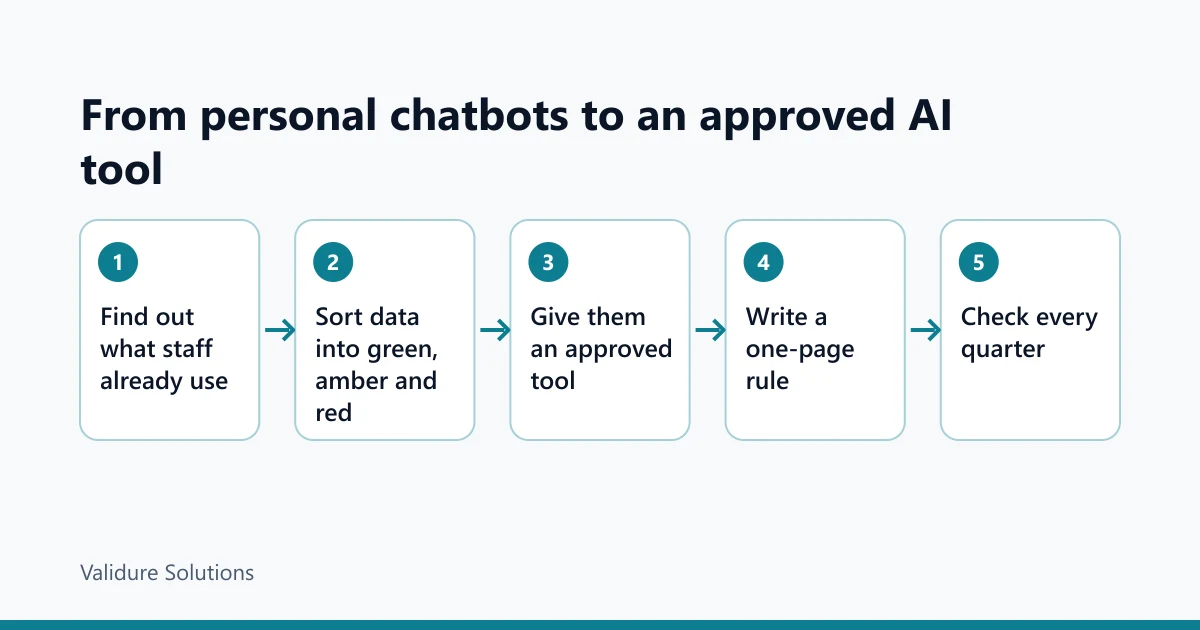
Step 1: find out what people already use
Start with a short, blame-free question to everyone: which AI tools do you use for work, on which device, and for what? You'll get a more honest list than any network log would give you.
For the 30-person example firm, the answers might look like this (an example, not survey data):
| Use | People | Typical data pasted |
|---|---|---|
| Drafting emails to customers and suppliers | 9 | Names, amounts, dispute details |
| Summarising long PDFs and contracts | 4 | Contract terms, counterparty names |
| HR letters and policies | 2 | Employee names, salaries, reasons |
| Excel formulas and data clean-up | 5 | Customer lists, sales figures |
| Nothing, or only personal use | 10 | None |
Two people handle the most sensitive data (HR), and the largest group mostly needs help with tone, which doesn't need real names at all.
Step 2: sort data into three colours
Staff won't read a data classification scheme. They will remember three colours.
| Colour | What it covers | In an AI tool |
|---|---|---|
| Green | Public or harmless: product descriptions, published prices, generic questions, your own rough notes with no names | Any approved tool |
| Amber | Business data about companies: supplier terms, sales totals, internal process documents, contract clauses with names removed | Only the approved business workspace |
| Red | Personal data and secrets: employee pay and records, customer names with phone numbers or addresses, PAN, Aadhaar, bank details, passwords, anything under an NDA | Not in any chatbot, unless the owner has approved a specific workflow for it |
Red is deliberately strict. If HR needs AI help with a warning letter, the safe habit is to replace the specifics before pasting. Say "Employee A, a sales executive, has been late 9 times in October" instead of the real name and pay. The tool needs the shape of the problem, not the person. If it can help without knowing who the person is, don't tell it who the person is.
Step 3: give them an approved tool, with the sums done
People use personal accounts because it's the easiest thing in reach. Make the approved tool easier: logged in on the work laptop, linked to the work email, already set up.
Whether to pay for a business plan is a cost question you can work out. Here's the formula, with a worked example. The seat price is an example figure for the arithmetic, not a quote; check your provider's current price for India, including GST.
Monthly value = users × hours saved per user per week × 4.33 × loaded cost per hour
Break-even hours per user per month = seat price per month ÷ loaded cost per hour
Example: 12 regular users, each saving 2 hours a week, at a loaded cost of 400 rupees an hour, with a seat price of 2,000 rupees a month.
| Line | Working | Amount (rupees) |
|---|---|---|
| Seat cost | 12 × 2,000 | 24,000 |
| Hours saved per month | 12 × 2 × 4.33 | 103.92 |
| Value of hours saved | 103.92 × 400 | 41,568 |
| Break-even per user | 2,000 ÷ 400 | 5 hours a month |
So in this example each user needs to save about 5 hours a month, a bit over an hour a week, for the seat to pay for itself. If a person uses the tool twice a month, don't buy them a seat. Give seats to the regular users and tell everyone else to keep to green data on whatever they use.
Who doesn't need any of this: a firm of four people where the owner writes everything and nobody handles personal data. A short spoken rule is enough there.
Step 4: write a one-page rule
Long policies don't get read. One page, plain language, examples from your own business. Here's a starting point to adapt.
- Use the company AI workspace for work. Don't use personal AI accounts for anything amber or red.
- Green data can go into any approved tool. Amber only into the company workspace. Red goes into no chatbot unless the owner has approved that exact use.
- Before pasting, remove names, phone numbers, addresses, PAN, Aadhaar, bank details and salary figures. Use "Customer A" or "Employee B".
- Read and check everything the tool writes before it goes out. You are responsible for the content, not the tool.
- Don't connect the tool to your work email, drive or calendar without asking first.
- If you think you've pasted something you shouldn't have, tell the office manager the same day. Nobody gets in trouble for reporting it.
Rule six matters more than it looks. If the paste went into a personal account, the person should delete that chat and switch off training on that account, and you should note what was pasted, when and where, in case a customer or employee asks later. Under the DPDP Rules, a personal data breach has to be reported to the Data Protection Board and to the affected people once those duties commence; whether a given paste counts as a breach depends on the facts, so ask an adviser if it involved red data.

Keep the rule where staff keep the rest of their policies, and get each person to acknowledge it. In Validure HR, policies sit in the same document store as offer letters and payslips, so the rule is next to everything else an employee has signed, and new joiners see it in their first week rather than when something goes wrong.
Step 5: technical controls, and their honest limits
Technical controls help at the edges. They don't replace the first four steps.
- Turn on single sign-on or at least work-email login for the business workspace, so access ends when someone leaves.
- In the workspace admin settings, check data retention, sharing of chats outside the company, and which connectors (email, drive) are allowed.
- If you use Google Workspace or Microsoft 365, check whether your edition already includes an AI assistant covered by your existing business terms. You may already be paying for one.
- Browser data loss prevention tools can flag a pasted PAN or card number, but only on managed browsers.
What none of these do: stop a phone on mobile data, stop someone retyping data, or catch an AI feature built into some other app staff use. That's why the rule and the habit come first.
Step 6: check it every quarter
A rule nobody checks is a rule people forget. A short quarterly check is enough for a small firm.
| Check | What to look for | What a hit means |
|---|---|---|
| Ask the same blame-free question again | Tools you didn't know about, or the same people still on personal accounts | The approved tool is missing something they need |
| Seat usage in the admin console | Seats nobody has used in 30 days | Reassign or cancel them; the break-even maths no longer holds |
| Admin settings | Chat sharing outside the domain switched on, new connectors added | Someone changed a setting without asking |
| Leavers in the last quarter | Their workspace access still active | Your exit checklist is missing a line |
| Self-reported slips | Zero reports for a long time | Either nobody slips, or nobody feels safe saying so |
| Provider terms | Changes to training defaults or retention | Update the rule and the table you gave staff |
The leaver line is the one most firms miss. Add "remove AI workspace access" to the same exit checklist that removes email and payroll access.
Where we'd draw the line (opinion)
This part is our view, not settled practice. For most firms of 10 to 100 people, we'd pay for business seats for the regular users, keep red data out of chatbots entirely for now, and spend more effort on the habit of removing names than on any blocking software. The habit protects you on every tool, including the ones you haven't heard of yet. The software protects you on the laptops you manage.
We'd be less relaxed in two cases: if your staff routinely handle health records, children's data or card data, and if a client contract says their data may not go to third-party tools. Read your client contracts before you approve any tool for amber data; some already forbid it.
Frequently asked questions
Is it illegal for staff to use ChatGPT at work in India?
No law bans it. The risk is putting personal data into a tool your company has no contract with. Under the DPDP Act, your business stays responsible for that data, and a processor should be engaged under a valid contract. Most of the business duties under the DPDP Rules commence in a phase ending around May 2027.
If an employee turns off training on their personal account, is that enough?
It's better than nothing, but no. The data still sits in an account the company can't see, delete or recover, and the provider may keep it for abuse checks. For amber or red data, use a company workspace with business terms.
Do business plans really not train on our data?
OpenAI says it doesn't train on ChatGPT Business, Enterprise or API data by default, and Google says qualifying Workspace editions aren't used for model training outside your domain without permission. That's what the providers state in their own terms. Read the current terms and the data processing addendum before you rely on it.
Someone already pasted customer details into a free chatbot. What now?
Ask them to delete the chat and switch off training on that account, and write down what was pasted, when and where. Don't make it a disciplinary matter unless it was deliberate. If the data was sensitive, such as financial or health details, talk to an adviser about whether it counts as a breach you must report.
Do we need a written AI policy if we have only 10 staff?
A one-page rule is worth having once anyone handles customer or employee data. It takes an hour to write, and it means the answer to "can I paste this?" doesn't depend on who you ask.
Sources and checks
Checked on 15 November 2026. Provider terms change; recheck before relying on them.
- OpenAI, Data controls in ChatGPT: help.openai.com
- OpenAI, How your data is used to improve model performance: help.openai.com
- OpenAI, Managing data, sharing and privacy in ChatGPT Business: help.openai.com
- Google, Gemini Apps Privacy Hub: support.google.com
- Digital Personal Data Protection Act, 2023, on India Code: indiacode.nic.in
- PIB, Government notifies DPDP Rules, 2025: pib.gov.in
- Ministry of Electronics and Information Technology: meity.gov.in
