
Why do OTP codes still get phished? Passwords, MFA and passkeys for a small office
By Validure team · · 14 min read
How a one-time code gets stolen in real time, why the 30-second expiry does not help, and what a 10 to 50 person office should switch on instead. Worked examples, a ranking of sign-in methods, and a checklist you can run this week.

Say the accounts clerk at a 22-person distributor gets an email at 11:40 that looks like the usual "your mailbox is almost full" notice. She clicks, sees the familiar sign-in page, types her password, and her phone buzzes with a six-digit code. She types that in too. The page says "something went wrong, try again later", so she shrugs and goes back to work. By 11:43 someone else is reading her mailbox, and by the afternoon a supplier has received a polite email, from her real address, saying the bank details have changed.
She had two-factor sign-in switched on. It did not help, and it was never going to help against this kind of attack. That's the short answer to the question in the title: a code you type into a page can be typed into the wrong page, and an attacker who sits between you and the real site simply passes it along before it expires.
This post explains how that works, which sign-in methods stop it, and the order a small office should change things in.
What actually happens in those three minutes
The fake page in the story is not a copy of the sign-in screen. It's a relay. The attacker runs a server that sits in the middle: everything the clerk types goes to the real site, and everything the real site sends back is shown to her. Microsoft's own security researchers described a campaign of exactly this kind in July 2022, which tried to reach more than 10,000 organisations, and they called it adversary-in-the-middle phishing.
Here is the timeline, as an example.
| Time | What the clerk sees | What the relay does |
|---|---|---|
| 11:40:05 | Familiar sign-in page | Fetches the real page and shows it to her |
| 11:40:20 | Types email and password | Sends both to the real site |
| 11:40:22 | Phone shows a code | Real site has sent the code, as it should |
| 11:40:31 | Types the code | Passes the code to the real site within a second |
| 11:40:32 | "Something went wrong" | Real site accepts the sign-in and hands over a session cookie, which the relay keeps |
| 11:43 | Back at work | Attacker loads the cookie into a browser and is inside the mailbox |
The code was used 9 seconds after it was sent. An authenticator app code usually changes every 30 seconds (the default in the standard, RFC 6238), and an SMS code often lasts a few minutes. The relay works in under one. Shorter codes would not change the outcome.
The part people miss is the session cookie. Once the real site has checked the password and the code, it gives the browser a cookie that says "this person already signed in". Whoever holds that cookie is treated as signed in, often for days. Microsoft's report says the attacker gets in regardless of the sign-in method, because the cookie is what the site trusts. That's why changing the password afterwards isn't enough. You have to end the sessions too.
None of this means two-factor sign-in is useless. It stops the far more common attack, where someone has your password from an old leak and tries it from their own laptop. It just doesn't stop a live relay.
Why some methods resist the relay and others don't
The question to ask of any sign-in method is: does the secret depend on which website is asking?
A password doesn't. A six-digit code doesn't either. You read it and type it, and nothing about the code knows whether the page in front of you is the real one or a copy. The human is the one checking the address, and busy humans check badly.
A passkey or a hardware security key works differently. Both use public-key cryptography under the WebAuthn standard (W3C, developed with the FIDO Alliance). When you register, the key is tied to the real site's domain. When you sign in, the browser tells the key which domain is asking, and the key only answers for the domain it was registered with. On a lookalike domain, there's nothing for it to answer. The clerk can be as distracted as she likes; the key does the checking.
This is why both NIST and CISA draw the line where they do. NIST's current digital identity guidance, SP 800-63B-4 (finalised in July 2025), says that authenticators where you manually type an output, such as one-time codes, are not phishing-resistant. CISA's 2022 fact sheet goes further and says the only widely available phishing-resistant method is FIDO/WebAuthn.
Here's how the common options compare.
| Method | Stops a reused leaked password | Stops a live relay page | Weak spot |
|---|---|---|---|
| Password only | No | No | Leaks, reuse, guessing |
| SMS or voice code | Yes, mostly | No | Relay, SIM swap, number porting |
| Authenticator app code (changes every 30 s) | Yes | No | Relay |
| Push "Approve?" with no number | Yes | No | Relay, and people tapping Approve to make the prompts stop |
| Push with number matching | Yes | No, but blocks blind approvals | Relay still works, because the fake page shows the real number |
| Passkey (synced or on the device) | Yes | Yes | Account recovery path, if it falls back to SMS |
| Hardware security key | Yes | Yes | Losing it without a spare |
Two notes on that table. NIST classes SMS and voice codes as "restricted": still allowed at its middle assurance level, but services must offer an alternative and watch for the number being moved to a new SIM. And number matching, where you type a number shown on the sign-in screen into your phone, is what CISA recommends as a stopgap for push-based apps. It beats a bare "Approve?" button, but CISA says plainly it isn't phishing-resistant.
The password rules that changed, and the ones that didn't
Most small offices still run on an old checklist: eight characters, one capital, one symbol, change it every 90 days. NIST has moved away from almost all of it.
Under SP 800-63B-4, services should not force periodic password changes unless there's evidence a password has been compromised, and should not demand arbitrary mixes of character types. What they should do is require length (at least 15 characters when a password is the only factor, at least 8 when it's one of two), allow long passwords of at least 64 characters, check new passwords against lists of known-leaked ones, and let people paste from a password manager.
The forced 90-day change was dropped because of what it does to behaviour. People pick a base and bump a number: Summer@2026 becomes Autumn@2026. An attacker who has the old one can guess the new one.
A worked example on length
Take a fully random 8-character password using all 95 printable keyboard characters. The number of possibilities is 95 to the power 8, which is 6,634,204,312,890,625.
Now take a passphrase of random words, picked by dice from a list of 7,776 words (that's 6 to the power 5, the size of the long list the Electronic Frontier Foundation publishes for this purpose).
| Password | Sum | Possibilities |
|---|---|---|
| 8 random characters | 95^8 | about 6.63 x 10^15 |
| 4 random words | 7,776^4 | about 3.66 x 10^15 |
| 5 random words | 7,776^5 | about 2.84 x 10^19 |
Four random words land in the same range as eight random characters, and they're far easier to type and remember. Add a fifth word and you multiply the possibilities by 7,776. Use passphrases for the few things a person must remember, and let a password manager generate the rest.
The example assumes the words are picked at random, not chosen by a person. And length does nothing against the relay in the opening story, which never guesses anything.
Where a small office should start
You can't switch everything to passkeys this week, and you don't need to. Start where the money and the mail are.
Say the 22-person distributor makes a list of every account that can move money or impersonate the business. As an example, it might come out like this:
| Account | People who sign in | Can it use passkeys or a security key? |
|---|---|---|
| Company email (admin) | 2 | Usually yes, on the major hosted email services |
| Company email (staff) | 22 | Usually yes, can be rolled out over a month |
| Bank corporate login | 3 | Depends on the bank; many still use their own OTP or token |
| GST portal | 1 | Uses its own OTP to a registered mobile; you can't change the method |
| Accounting or ERP | 4 | Depends on the vendor |
| Domain and website hosting | 1 | Usually yes |
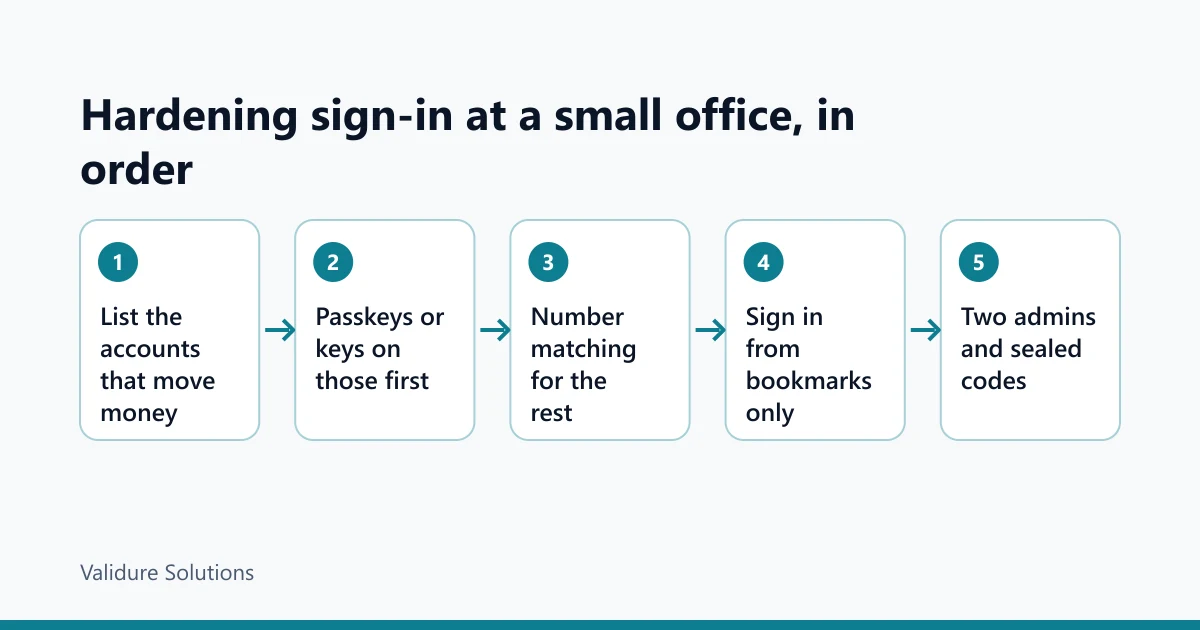
That's six systems, and only three or four will let you choose a phishing-resistant method today. Do those first, in this order: email admin accounts, the domain registrar, then all email. Email comes first because it's the reset channel for almost everything else. Whoever controls it can reset the rest.
For hardware keys, buy two per person who needs them, and register both. In the example, the 2 email admins, the 1 person who manages the domain and the 3 bank users come to 6 people, but the domain manager is also one of the admins, so it's 5 people and 10 keys. The spare goes in the office safe, not in the same bag.
For the systems you can't change (the bank's own OTP, the GST portal), the defence shifts from the method to the habit. Sign in only from a bookmark or by typing the address, never from a link in an email or a message. Turn on every alert the bank offers. And agree a rule with suppliers and customers that a change of bank details is confirmed by a phone call to a number you already had, not one in the email.
Where your own software holds the money trail, the audit trail is the second line. Validure ERP keeps a full audit trail of who changed what and when, which is what you'll want if a "new bank details" email ever gets acted on. It won't stop the phish. It tells you quickly what happened.
A checklist you can run this week
| Check | What to look for | What a hit means |
|---|---|---|
| Admin accounts on email | Any admin signing in with only a password, or SMS | Fix first; one admin takeover is the whole company |
| Sign-in methods per user | Users with push approval but no number matching | Turn on number matching now, plan passkeys next |
| Mailbox forwarding rules | Rules sending mail to outside addresses, or rules that move or delete mail containing "invoice" or "bank" | A classic sign an account was already taken over; investigate before deleting |
| Active sessions | Sign-ins from unexpected cities or devices in the last 30 days | End all sessions for that user, then reset the password |
| Shared logins | One password used by several people, kept in a notebook or chat | Move to a shared vault in a password manager, with access per person |
| Recovery paths | Accounts with passkeys but recovery by SMS to one person's phone | The weakest path is the real one; add a second admin and sealed backup codes |
| Leavers | Accounts of people who left still active, or still holding a key | Disable the account the day they leave; collect the key |
Attackers commonly add a rule that hides the supplier's replies from the real owner. A rule nobody remembers making is evidence, not clutter.
The question nobody asks until someone is in hospital
A common question on security forums: what happens if the one person who knows the passwords is suddenly unavailable? Stronger sign-in makes it sharper, because a security key in someone's drawer at home is useless to the office.
The answer is two of everything. Two email admins, held by different people, each with their own keys. Backup codes printed once, sealed and signed across the seal, kept in the office safe with a register of who opened it. And a one-page list of every system, who administers it and where its recovery codes live, without the passwords.
Role-based permissions help here too. Validure HR, for example, has role-based permissions, so a second owner-level account can exist without everyone being an admin. Set it up before the day you need it.
Who doesn't need all of this
A three-person shop that does its banking from one phone, uses one email account and has nothing else online doesn't need hardware keys or a policy document. Switch on the strongest sign-in your email and bank offer, use a password manager, and never sign in from a link. That's most of the benefit.
If someone in your office pays suppliers on the strength of an email, you're the target this post describes.
If it happens anyway
End all sessions for the affected account, not just the password. Note, then remove, any forwarding or hiding rules. Check what was sent from the mailbox and warn anyone who received a payment request. Call the bank at once if money moved, because recalls depend on speed.
There may be a reporting duty too. CERT-In's directions of 28 April 2022, under section 70B of the IT Act, require service providers, intermediaries, data centres, body corporates and government bodies to report certain cyber incidents to CERT-In within 6 hours of noticing them. Which incidents count, as narrowed by CERT-In's FAQs, is worth checking with your adviser. This is information, not legal advice.
The routine, in one screen
Sources and checks
Checked on 5 November 2026. The worked examples (the distributor, the timeline, the account list) are made-up examples; the sums in the length table are exact and you can repeat them on any calculator.
- NIST SP 800-63B-4, Digital Identity Guidelines: authentication and authenticator management, finalised July 2025 (pages.nist.gov/800-63-4).
- CISA fact sheets on implementing phishing-resistant MFA and on number matching, October 2022 (cisa.gov/mfa).
- Microsoft Security blog, "From cookie theft to BEC", 12 July 2022 (microsoft.com/security/blog). Microsoft's own research; it says the campaign attempted to target more than 10,000 organisations.
- RFC 6238, the time-based one-time password standard, for the 30-second default step (rfc-editor.org).
- W3C Web Authentication (WebAuthn) and the FIDO Alliance, for how passkeys and security keys are tied to a domain (w3.org/TR/webauthn, fidoalliance.org).
- EFF dice-generated passphrase word lists, for the 7,776-word list (eff.org).
- CERT-In directions under section 70B(6) of the IT Act, 28 April 2022, and CERT-In's FAQs on them (cert-in.org.in).
Frequently asked questions
Is SMS OTP still better than nothing?
Yes. It stops someone who has your password from an old leak and tries it from their own device, which is the most common attack. It doesn't stop a relay page or a SIM swap, so treat it as the floor.
Are authenticator app codes safer than SMS?
Somewhat. They can't be intercepted through the phone network or a SIM swap. But you still read the code and type it, so a relay page can pass it along just as easily. Against phishing, an app code and an SMS code fail in the same way.
What's the difference between a passkey and a hardware security key?
Both use the same WebAuthn standard and both are tied to the real site's domain. A passkey usually lives in your phone or computer and can sync across your devices. A hardware key is a separate device you plug in or tap. For admin accounts, a hardware key with a registered spare is the stricter choice.
If I use a password manager, do I still need two-factor sign-in?
Yes. A password manager stops reuse and weak passwords, and it won't fill your password on a lookalike domain, which is a useful warning. If the password leaks anyway, the second factor still stops a sign-in from elsewhere.
Should we still make staff change passwords every 90 days?
NIST's current guidance says no, unless there's evidence a password was compromised. Require long passwords, check them against leaked-password lists, and change them when something suggests a leak.
Our bank only offers its own OTP. What else can we do?
You can't change the bank's method, so change the habits around it. Sign in only from a bookmark, switch on every transaction alert, set payment limits and a second approver if the bank offers them, and confirm any change of supplier bank details by calling a number you already had.
