
Why payroll goes wrong every month, with the maths and the checks
By Validure team · · 11 min read
A technical walk through how a monthly payroll run breaks. Worked examples for pro-rating, night shifts, arrears and the new 50 per cent wage rule, plus the checks that catch errors before payslips go out.

Take a 24-person company that runs payroll on the 28th. On the 29th someone mails to say they were paid for a day they took off. On the 30th operations notices that a night shift from last month never made it into the sheet. By the 1st, HR has spent half a day on corrections and two people have started checking their payslips against their own notes.
Nothing in that story is a calculation bug. The salary formula was fine. What went wrong was what the formula was given.
This post treats a payroll run like a data pipeline, because that's what it is. It shows where bad inputs get in, works through the numbers for the cases that cause most disputes, and gives you checks that catch problems before the run. It's written for the person who closes the month and for whoever builds or buys the system they close it in.
Payroll is a pipeline, and errors enter at the front
Strip it down and a run looks like this:
| Inputs | Derived | Output |
|---|---|---|
| attendance facts | payable days | gross pay |
| leave ledger | leave deductions | statutory deductions (PF, ESI, PT, TDS) |
| salary structure | earnings by component | net pay |
| employment events | proration factors | payslip and bank file |
Everything to the right of the arrows is arithmetic, and arithmetic is deterministic. If the same inputs produce a different answer on two runs, you have a bug. If different people reach different answers from the same month, the inputs weren't the same: the sheet was edited, a leave went unrecorded, a joining date was remembered rather than read.
So the first principle is that each input has one owner and one place. Attendance lives in one table. Approved leave lives in a ledger. Salary structures are versioned with an effective date. Joiners and leavers are events with dates, not rows someone deletes.
Case 1: pro-rating a joiner
Pro-rating looks trivial until two people do it differently. Say someone with a monthly salary of 62,000 joins on Monday 12 October 2026.
October 2026 has 31 calendar days and 22 working days if your week is Monday to Friday. From the 12th to the 31st there are 20 calendar days and 15 working days.
| Method | Formula | Pay for October |
|---|---|---|
| Calendar days | 62,000 x 20 / 31 | 40,000.00 |
| Working days | 62,000 x 15 / 22 | 42,272.73 |
That's a difference of 2,272.73 for one person in one month, caused entirely by which denominator the person running payroll picked. Neither is wrong. What's wrong is picking per run. Write the rule into the policy, apply it to joiners and leavers alike, and store the factor on the payslip so anyone can recompute it.
Use calendar days if your pay is a monthly figure with no link to days worked. Use working days only when you also pay for weekly offs and holidays on the same basis. Mixing the two across joiners and leavers is the usual cause of the "why did she get more than me" question.
Case 2: leave as a ledger, not a number
Leave balances go wrong when they're stored as a single editable number. Store them as a ledger instead: every accrual is a credit, every approved leave is a debit, every adjustment has a reason and an author.
If monthly accrual is 1.5 days and someone joins in April, their balance on 1 October is the sum of the credits since joining minus the debits taken. Anyone can replay it. A balance that was typed over can't be replayed, which is why people dispute it.
The most common payroll leak here is a leave approved by email and never deducted, or deducted twice because HR and a manager both processed it. One check catches the second kind and the opposite problem, an approved leave on a day the person punched in. In a spreadsheet, put the approved leave dates next to the attendance sheet and filter for any date that also has a punch-in. If you have a developer, this is the query:
-- approved leave on a day with attendance: one of the two is wrong
SELECT l.employee_id, l.leave_date, a.punch_in, a.punch_out
FROM   leave_days l
JOIN   attendance a
       ON a.employee_id = l.employee_id
      AND a.work_date   = l.leave_date
WHERE  l.status = 'approved'
  AND  a.punch_in IS NOT NULL;
Run the check before every payroll. It takes a minute and the rows it returns are almost always real mistakes.
Case 3: shifts that cross midnight
A night shift from 22:00 on 31 October to 06:00 on 1 November is one shift. Naive systems split it into two partial days, one in October and one in November, and then each month looks short.
The rule that works: attribute the shift to the day it started, store one punch-in and one punch-out, and decide in writing which payroll month a spanning shift belongs to. Two checks in a spreadsheet cover it:
| Check | What to look for | What a hit means |
|---|---|---|
| One row per shift | Sort the attendance sheet by employee and punch-in. Each shift should be a single row, dated by its start, with hours worked as punch-out minus punch-in, times 24 | Two part rows for one night, or hours that come out far too short |
| Shifts with no punch-out | Filter for rows that have a punch-in, an empty punch-out and a punch-in older than 16 hours | A shift that will be dropped from pay unless someone resolves it |
The second check is the one that saves you. A shift with a punch-in and no punch-out is silently dropped by most sheets. Flag anything older than your longest legitimate shift and have a person resolve it before the cut-off.
If you also run a payroll cycle that doesn't end on a calendar month, for example the 26th to the 25th for night-shift staff, keep the cycle on the employee record, not in someone's head.

Case 4: a late raise and the arrears it creates
A raise from 50,000 to 55,000 is effective 1 August but approved on 10 October. If the October run just uses the new salary, August and September stay underpaid.
Arrears for the two months are 2 x 5,000 = 10,000 before deductions. Show them on their own payslip line so the employee can see what they are. Then check the knock-on effects: PF and ESI bases for those months change too, and so does income tax projection for the year if you're deducting TDS on salary.
The mistake to avoid is editing August and September after they were closed. Leave closed periods closed and carry the correction forward as arrears, with a note. That keeps last month's reports true to what was paid.
Statutory deductions and the new wage definition
Payroll in India has changed under the four labour codes, which the government brought into effect on 21 November 2025. The part that moves numbers is the wage definition: components outside the listed exclusions can't exceed 50 per cent of total remuneration, and anything above that is counted as wages. That feeds PF, gratuity and bonus bases.
A worked example, assuming you contribute PF on actual wages rather than on the 15,000 ceiling:
| Before restructuring | After restructuring | |
|---|---|---|
| Monthly remuneration | 60,000 | 60,000 |
| Basic + DA | 24,000 (40%) | 30,000 (50%) |
| Employee PF at 12% | 2,880 | 3,600 |
| Take-home change | about 720 lower, per month |
The employer share rises by a similar amount, and gratuity accrues on the larger base. If your structure keeps basic low and pushes the rest into allowances, this is the check to run.
Two cautions. First, whether PF applies to full wages or only up to the 15,000 ceiling depends on how your company contributes, so confirm with your PF consultant. Second, rules and state-level details were still being notified in 2026, and most of what's published online is from payroll vendors. Treat the above as the shape of the change and check the exact formula against the official notifications.
For ESI, the current rates are 0.75 per cent employee and 3.25 per cent employer on wages, for people whose gross wage is up to 21,000 a month. Note that crossing the threshold mid-year doesn't remove coverage until the end of the contribution period, which is another reason these need to be calculated from dated records rather than remembered.
The checks that catch most of it
Do these in order, every month. Put the dates in a calendar so nothing depends on memory.
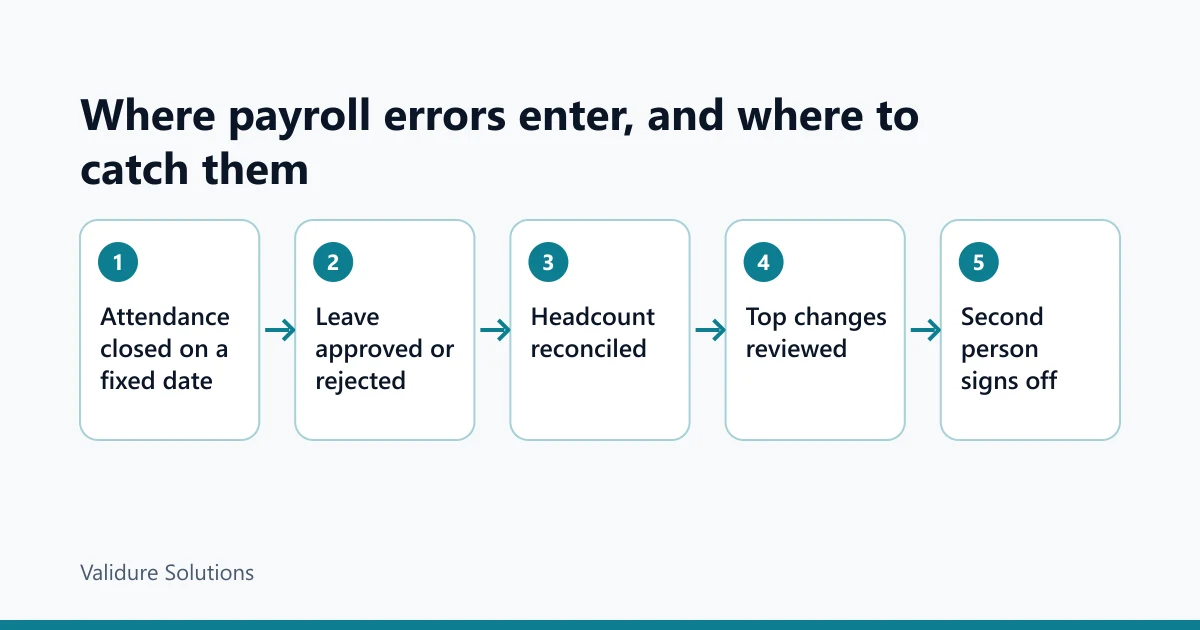
- Close attendance on a fixed date and block edits afterwards. Late changes become next month's corrections, with a note.
- Resolve every pending leave request and every open punch.
- Reconcile headcount. Opening staff plus joiners minus leavers must equal the number of payroll lines.
- Compare each person with last month and flag the movers.
- Have someone who didn't prepare the run sign off the total.
Steps 3 and 4 are worth doing as a routine. The headcount identity is one line. The comparison is a variance check you can build in a spreadsheet:
| Check | What to look for | What a hit means |
|---|---|---|
| Month-on-month change | Net pay for last month and this month side by side, with a third column for this month minus last month. Flag any change bigger than 500 or 3 per cent of last month's pay, whichever is larger | A raise, a deduction, arrears or an error |
| No row last month | Anyone listed this month who has no figure for last month | A joiner, or someone missing from last month's run |
Set the threshold to what's meaningful for your pay levels. Three per cent or 500, whichever is larger, is a reasonable start for a company in the tens of thousands per month per person. The flagged rows are your review list: joiners, leavers, raises, deductions, arrears. If a row isn't explained by one of those, something went wrong.
Fix the process, not just the month
Checklists find errors. They don't stop them being made. The structural fix is one place for attendance, leave and salary structures, and a payroll run that reads them rather than copies them.
That's what we built Validure HR around: attendance with self-service punch and optional biometric devices, leave with monthly-accruing balances, payroll with salary structures, payslips and salary sheets, and night-shift and per-company payroll cycles. The screen below is from it, with sample data. The useful part isn't the layout. Pending leave sits next to today's attendance, so whoever closes the month sees what's unresolved before running payroll.
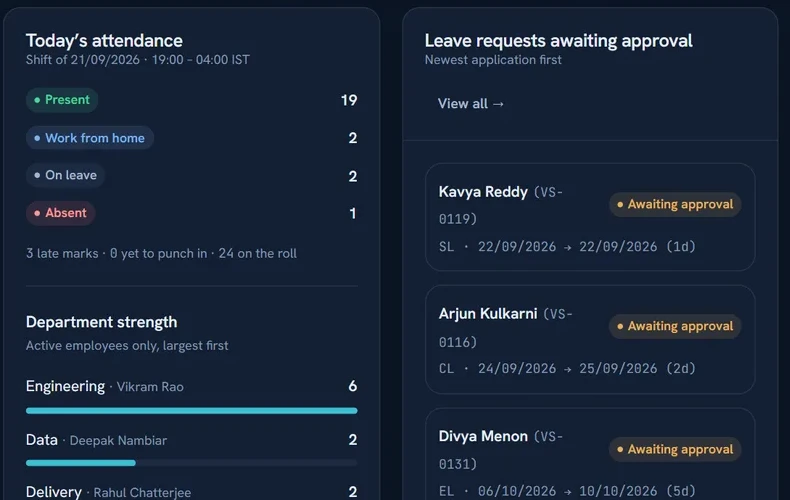
You may not need it. With five or six people, one site and no shifts, a well-kept sheet plus the checks above will do. The case for a system grows with headcount, with shifts and with the number of legal entities, because that's where re-keying turns into real money.
If you're evaluating any tool, including ours, ask five things. Does approved leave reach payroll without anyone retyping it? What does it do with a shift that crosses midnight? Can you review the salary sheet before payslips are released? Is every correction logged with a name and a time? And can you export your data if you leave?
Sources and checks
Rates and rules change, so verify against the official sources before relying on any figure here: the EPFO site for PF, the ESIC site for ESI, and the Ministry of Labour and Employment for the labour codes and their rules. The worked examples use round numbers for clarity and are illustrations, not advice.
Frequently asked questions
Why does my payroll differ from last month with no obvious reason?
An input changed and nobody noticed: attendance, leave, a salary component or a joiner or leaver. Run a month-on-month variance and explain every row above your threshold.
Should I pro-rate by calendar days or working days?
Pick one in writing and use it for everyone. With a monthly salary, calendar days is simpler and avoids disputes. The difference can be a couple of thousand rupees per person per month, so consistency matters more than the choice.
How should I treat a night shift that spans two months?
Attribute it to the day it started, record it as one shift, and state in your policy which month it belongs to.
How do I handle a raise approved after the month closed?
Leave the closed months alone. Pay the difference as arrears in the next run on a separate line, and check the PF, ESI and TDS effects.
Do the new labour codes change my PF calculation?
They change the wage definition, which can raise the base if allowances exceed 50 per cent of remuneration. Confirm how your company contributes and check the official notifications.
Do small companies need payroll software?
Often not. Under about ten people with one site and no shifts, a careful sheet and a monthly routine like this is enough.
