
Local AI model or cloud API for your business documents? The privacy argument, tested with numbers
By Validure team · · 14 min read
Should bills, bank statements and HR letters go to a cloud AI API or to a model on your own machine? Both sides at full strength, what the DPDP Act and provider terms actually say, a worked cost comparison per document, a break-even formula and the checks that matter more than where the model runs.

Say a 40-person trading firm wants AI to read its paperwork. About 2,000 documents a month: supplier bills, bank statement pages, the odd offer letter and salary revision. The accounts head has tried a cloud model on a few bills and it worked. Then the owner asks the question that stops the project. "Our bank statements and salary letters are going to a server in another country? Can't we run this on our own computer?"
Both camps that answer it online are partly right. One says anything sensitive must stay on your premises. The other says a local model is a worse model on a machine you'll never patch. This post puts both cases at full strength, works through the cost for the firm above, and then says what we'd do, labelled as opinion.
Our interest: we build business software and use AI tools ourselves. We don't sell models or hardware.
This is information, not legal advice. If you handle health, legal or other regulated data, talk to someone who advises on data protection for your sector.
What actually happens to a document in each setup
With a cloud API, your software sends the document over an encrypted connection, the model answers, and the provider keeps a copy for a while under its terms. Anthropic's privacy centre says it deletes API inputs and outputs within 30 days, except for features where you control retention (such as stored files), other contract terms, legal requirements and content flagged for policy violations. OpenAI's enterprise privacy page says it doesn't train on business data by default and may keep API inputs and outputs for up to 30 days to spot abuse, with zero retention available on approval.
With a local model, the model file sits on a machine you own, and the document never leaves your network unless something else sends it. That "unless" matters. The chat front end, a plug-in, a sync folder, or a setting that falls back to a cloud model when the local one is busy can all send data out. Local isn't private by default. It's private if you check.
What the law says in India (established, as of November 2026)
The Digital Personal Data Protection Act, 2023 applies when the documents contain personal data: names, phone numbers, PAN, salary, bank details of individuals. A bill from a company to a company often has very little. A salary letter is almost all personal data.
- Your business is the data fiduciary. A cloud provider processing data for you is a data processor, and the Act lets you use one under a valid contract. Responsibility for the data stays with you either way.
- Section 8(5) requires reasonable security safeguards to prevent a personal data breach. The Schedule to the Act sets the highest penalty band, up to 250 crore rupees, for failing that duty. It applies to your own server just as much as to a provider's.
- Section 16 lets the government restrict transfers to countries it notifies. It's a blocklist, not an allowlist. We could not find any country notified as of this writing, but check before relying on that.
- The DPDP Rules, 2025 were notified in November 2025 with a phased start. Most of the duties on businesses (notices, security measures in Rule 6, breach reporting, data principal rights) commence 18 months after notification, around May 2027. Check the commencement notification for the exact date.
So, established: the Act doesn't ban cloud AI and doesn't require self-hosting. It requires a lawful basis, a contract with your processor, reasonable security and accountability, wherever the processing happens. Anyone telling you local hosting is "DPDP compliant" and cloud isn't is selling something.
The case for running it locally
Every copy of a document is a copy that can leak. A cloud call creates at least one copy outside your control, held for up to 30 days, in a jurisdiction you didn't pick, under terms that the provider can change with notice. Abuse-monitoring logs can be read by the provider's staff when something is flagged. "Not used for training" is a promise about one use of the data, not a promise that it isn't stored or seen. A local model creates no such copy.
Terms of service change. A provider can be acquired, ordered by a court to preserve logs, or hacked, and you can't audit any of it. On a local machine, retention is whatever you set.
And at scale, one more document costs little more than electricity.
The case for using a cloud API
The privacy risk people fear from the cloud is mostly the risk of a breach, and breaches happen where security is weakest. A large provider runs security teams, audits and incident response. A tower PC under the accounts desk runs whatever Windows updates someone remembered to install, with a shared login and no logs. Section 8(5) cares about reasonable safeguards. For most small firms, the provider's are better than theirs.
Quality is the second argument, and it's a real one. A model that runs comfortably on one office graphics card is typically around 8 billion parameters, squeezed to about 4 bits per weight. The llama.cpp project lists one such file at about 4.9 GB; with room for an 8,000-token document you need roughly 6.5 to 7 GB of video memory. That's far smaller than the hosted models priced below. If it misreads more, the person checking its work spends more time, and that time costs more than the API would.
Third, someone has to run it: updates, disk space, restarts when it hangs. In a 40-person firm that's usually the person who also fixes the printer. And at small volumes, the cost argument runs the other way.
The numbers for 2,000 documents a month
Everything in this section is an example to show the method. Your token counts, hardware quotes and power tariff will differ.
Say each document, with the instructions you send alongside it, is about 4,000 input tokens, and the model returns about 500 tokens of extracted fields.
| Item | Per document | Per month (2,000 documents) |
|---|---|---|
| Input tokens | 4,000 | 8,000,000 (8 million) |
| Output tokens | 500 | 1,000,000 (1 million) |
Anthropic's published prices when we checked on 11 November 2026 were 0.10 dollars per million input tokens and 0.50 per million output for Claude Haiku 5.5 (for prompts up to 100,000 tokens), and 2 and 10 dollars for Claude Sonnet 5.5. The batch interface, for work that can wait for results, halves both.
| Route | Input cost | Output cost | Month | Month, batch |
|---|---|---|---|---|
| Small cloud model | 8 x 0.10 = 0.80 dollars | 1 x 0.50 = 0.50 dollars | 1.30 dollars | 0.65 dollars |
| Mid-size cloud model | 8 x 2 = 16 dollars | 1 x 10 = 10 dollars | 26 dollars | 13 dollars |
At an example rate of 88 rupees to the dollar, that's about 114 rupees a month for the small model and 2,288 rupees for the mid-size one, before batch discounts. Per document, 0.057 and 1.144 rupees.
Now the local machine. Say a workstation with a 16 GB graphics card costs 2,50,000 rupees (an example figure; get quotes), written off over three years. It draws about 350 watts while working, 8 hours a day, 22 days a month, at an example tariff of 10 rupees per unit. And someone spends about 4 hours a month looking after it, at 1,000 rupees an hour of their time.
| Local cost | Working | Per month |
|---|---|---|
| Hardware over 36 months | 2,50,000 / 36 | 6,944 rupees |
| Electricity | 0.35 kW x 8 h x 22 days = 61.6 units x 10 | 616 rupees |
| Upkeep time | 4 h x 1,000 | 4,000 rupees |
| Total | 11,560 rupees |
The break-even formula is simple:
documents per month at break-even = monthly local cost / cloud cost per document
Against the mid-size model: 11,560 / 1.144 = about 10,100 documents a month. Against the small model: 11,560 / 0.0572 = about 2,02,000 documents a month.
For our example firm at 2,000 documents, local costs roughly five times what the mid-size cloud model costs, and about a hundred times the small one. And the comparison flatters the local machine, because it pits an 8-billion-parameter model against bigger ones. If the local model needs a person to correct even a few extra documents a month, the gap widens.
At 50,000 pages a month against a mid-size model, the sums flip, and the privacy case costs nothing extra.
Testing the privacy argument
When you list where data can actually leak, the location of the model is one row among many.
| Check | What to look for | What a hit means |
|---|---|---|
| Which account sends the data | Documents going through a company API key under business terms, not staff pasting into a personal chatbot | Personal accounts may have different training and retention terms, and this is the gap nobody sees |
| What the request contains | Full documents sent when the task needs only a few fields; PAN, bank account or salary sent when not needed | You're sharing more personal data than the job needs, on either route |
| Provider retention and contract | A data processing agreement in place; retention terms read, including features that store files longer | No contract with a processor is a gap under the DPDP Act |
| Local machine exposure | Shared logins, no disk encryption, no updates, model front end reachable from the whole office network | The local copy is easier to steal than the cloud one |
| Silent fallbacks | Settings that route to a cloud model when the local one fails or is slow; plug-ins and sync folders | Your "local" setup is sending data out without anyone deciding to |
| Outputs | Extracted results saved in chat history, downloads folders or shared drives with no owner | The answer often holds the same personal data as the document |
Run through it and a pattern shows up. A trimmed request from a company account, under a contract, is safer than a local model on an unpatched PC everyone can reach. A well-run local machine beats both, but you pay for it.
Trimming is the cheapest control, and it works on both routes. A model extracting bill fields doesn't need the bank account number at the bottom. Mask it or crop to the line items, and the risk is gone rather than managed.
What's settled and what's still argued
Established: Indian law neither requires nor bans either route; both need reasonable security. The two largest providers don't train on business API data by default and keep it up to about 30 days, with exceptions. Below a few thousand documents a month, cloud is far cheaper.
Contested: how much a small local model loses on real business documents (measure it on your documents; don't trust anyone's benchmark, ours included). Whether provider promises can be trusted over years. Whether a small firm can really run a server as safely as a large provider runs theirs.
Thin evidence: how often provider-side retention has actually exposed business data. We found no solid public data.
Where we come down (opinion)
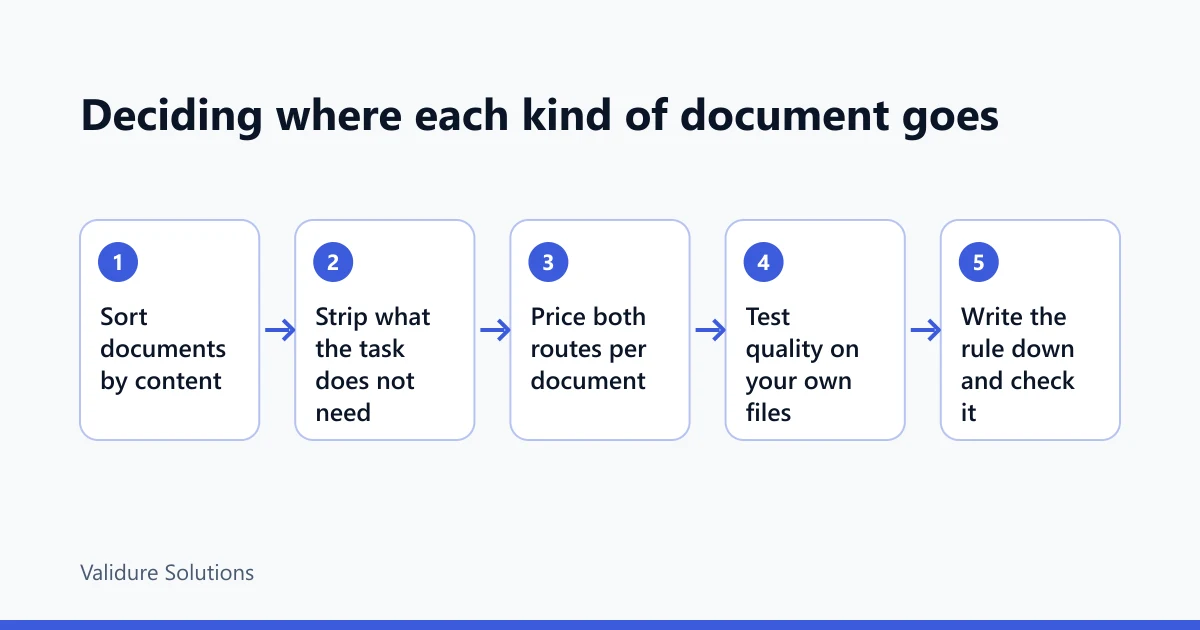
For a small or mid-size firm, we'd use a cloud API for most documents, under a business account with a data processing agreement, and we'd spend the effort on what's sent rather than where it goes. Strip fields the task doesn't need. Mask account numbers. Turn off or shorten stored history where the provider lets you.
We'd keep a short list of document types that don't leave the building at all: salary and appraisal letters, medical certificates, anything under legal privilege, anything a client contract says must stay on your premises. For those, either a local model on a machine that's properly locked down, or no AI.
And we'd revisit at volume. If you pass roughly the break-even worked out above for the model quality you need, the local route starts paying for itself, and the privacy argument becomes free.
A decision table
| Your situation | Lean towards | Why |
|---|---|---|
| Under a few thousand documents a month, mostly business-to-business bills | Cloud API, business terms, trimmed requests | Cheaper by a wide margin, better model, little personal data |
| Mixed documents, some with salary or health details | Cloud for most, local or manual for a named list | Keeps the sensitive few in-house without paying for everything |
| Client contract or sector rule says data stays on premises | Local, or no AI for that work | The contract decides, not the cost |
| Tens of thousands of pages a month, steady load | Price both with the formula above; local often wins | Volume pays for the hardware and the upkeep |
| No one to look after a server | Cloud | An unmaintained local machine is the weaker safeguard |
Who this doesn't apply to: a business reading a few dozen documents a month. At that volume, a person typing them in is cheaper than setting up either route.
Getting the results into your books
Either way, the model's output is a file of fields that has to land somewhere with a record of who put it there. In Validure ERP, extracted rows can come in through the Excel and CSV import, and the audit trail records it, so a wrong figure traces back to its batch. On the HR side, Validure HR keeps offer letters and payslips in one document store with role-based permissions, a sensible home for the "doesn't leave the building" list. Neither product runs the AI model; they hold what it produces and what it shouldn't see.
If you're still deciding whether AI reads your bills well enough at all, the 50-invoice test in Can AI replace my invoice data entry? is the place to start. Run it on both routes and you'll have your own quality numbers.
Sources and checks
Provider terms and prices change often. Read them yourself before deciding: Anthropic's privacy centre and API pricing, OpenAI's enterprise privacy page. For the law, the Digital Personal Data Protection Act, 2023 and DPDP Rules, 2025 on MeitY and the government's Press Information Bureau release on the notification of the Rules. Model memory figures are from the llama.cpp project documentation. Prices and terms were checked on 11 November 2026. Hardware prices, tariffs, exchange rate, token counts and upkeep hours are examples, not quotes.
Frequently asked questions
Is it illegal in India to send business documents to a cloud AI service?
No. The DPDP Act doesn't ban it. With personal data you need a lawful basis, a contract with the provider as your processor and reasonable security. Most duties under the 2025 Rules start around May 2027. Sector rules or client contracts can be stricter.
Do cloud AI providers train on what we send through the API?
The two largest say they don't train on business API data by default. That's separate from storage: both keep inputs and outputs for up to about 30 days, with exceptions. Consumer chat plans can have different terms, which is why staff using personal accounts is the bigger risk.
What computer do we need to run a model locally?
An 8-billion-parameter model at 4-bit needs roughly 6.5 to 7 GB of video memory with an 8,000-token context, so an 8 GB graphics card is the floor. Longer documents need more.
At what volume does a local model become cheaper?
Divide your monthly local cost (hardware over its life, power, upkeep time) by the cloud cost per document. In our example: about 10,100 a month against a mid-size cloud model, around 2,00,000 against a small one.
Is a local model as accurate as a cloud one?
A small local model is usually weaker than the larger hosted ones, but it depends on the documents. It can do well on clean, consistent bills and badly on handwritten or unusual ones. Test both on the same 50 of your own documents and compare whole-document error rates.
What's the cheapest privacy improvement we can make today?
Send less. Mask bank account numbers and PAN where the task doesn't need them, crop to the part of the page that matters, and make sure everyone uses the company account rather than a personal one.
