
Is the antivirus built into Windows enough for a small office, or should you still pay for one?
By Validure team · · 13 min read
The renewal quote for paid antivirus has arrived and someone says Windows already has it built in. Both sides of the argument at full strength, what independent lab tests and Microsoft's own documentation say, a cost comparison for a 14-person office, and the checks that matter more than the brand. Checked on 16 November 2026.

Say a 14-person trading office in Surat gets the renewal mail for its antivirus: 14 licences, another year, please pay by the 30th. The owner forwards it to the person who looks after the computers, a sharp junior accountant who also fixes the printer. The accountant says Windows already comes with antivirus, so why pay twice? The local IT vendor who sold the licences says the free one is basic and the office will regret it. Both sound sure of themselves. Who's right?
Here's my answer, labelled as opinion: on Windows 10 and 11, the antivirus Microsoft builds in is good enough at catching malware that a small office doesn't need to buy a separate consumer antivirus for detection alone. What you'd be paying for in a business product is something else: one screen that shows every PC, alerts that reach a person, and tools to act when something gets through. That's worth money at some point. For many offices the cheapest way to buy it is from Microsoft itself, and for some it isn't needed at all.
The vendor's side has real points too, and they're set out below at full strength. A note on interest: we build business software and don't sell or resell any security product, and we have no arrangement with any vendor named here.
What's established
Some of this isn't a matter of opinion.
Microsoft Defender Antivirus is part of Windows 10 and Windows 11. It's on by default, it updates itself, and it costs nothing extra.
Independent labs rate it highly. AV-TEST, a German lab that tests security products every two months, gave Microsoft Defender Antivirus the maximum 6 out of 6 for protection in each of its Windows 11 home-user rounds published in 2026 that I checked, and a "Top Product" award. In the May to June round it dropped half a point on performance, meaning its effect on the speed of the PC, to 5.5 out of 6. AV-Comparatives, an Austrian lab, publishes similar real-world protection tests where it also scores in the high nineties. Lab results move from round to round, so look at the latest ones yourself rather than trusting a figure in a blog post, this one included.
Microsoft's own documentation says that on Windows 10 and 11, when you install a non-Microsoft antivirus and the PC isn't enrolled in Microsoft's paid endpoint service, Defender Antivirus switches itself to disabled mode. So buying a third-party antivirus doesn't add a layer on top of Defender. It replaces it.
And Windows 10 stopped getting security fixes for the operating system on 14 October 2025, unless you pay for Extended Security Updates. Microsoft says it will keep sending Defender Antivirus its malware definitions on Windows 10 through October 2028. Those are two different things, and the difference matters further down.
The case for paying, at full strength
The vendor's best argument isn't that Defender is weak at catching viruses. It's that nobody is watching.
On a small office's PCs, the built-in Defender works one machine at a time. When it blocks something, it shows a notification to whoever is sitting at that PC. If it's the receptionist, she clicks it away. If Defender has been switched off on one machine, by a user, by a bad installer, by an old program that complained, nobody else knows. There's no list of "all 14 PCs, protected or not". The owner can't answer the simplest question: are we covered today?
A business security product fixes exactly that. You get a console that lists every device, shows which ones are out of date or unprotected, sends alerts by email, and lets someone isolate a machine or run a scan remotely. Microsoft Defender for Business, for example, adds endpoint detection and response (tools that record what happened on a machine and help stop an attack in progress), vulnerability management that points out missing patches, monthly security reports and central management, according to Microsoft's product page.
Second, mixed fleets. If the office also has a couple of Macs and staff phones that read company email, the built-in Windows protection does nothing for those. Business products cover several platforms from one place.
Third, someone to call. A paid product often comes with a vendor or IT partner who answers the phone when a PC starts encrypting files. For an office without an IT person, that's not trivial.
Fourth, paperwork. Cyber insurance proposals and some larger clients' vendor questionnaires ask whether you run "endpoint protection" and how you monitor it. A console you can screenshot is an easy answer. "Each PC runs whatever came with Windows" is a harder one.
These are good reasons. Notice that none of them is about detection rates.
The case for the built-in one, at full strength
The case for staying with Defender starts with the lab results: on the tests that measure catching malware, it's at the top, alongside the paid products.
It's also one fewer thing to break. Every extra security agent hooks into the operating system. Consumer suites often bundle a VPN, a "PC cleaner", a password vault and pop-ups asking you to upgrade. Each one is software to update and a possible cause of slowdowns or conflicts. We wrote about how that kind of clutter slows machines in why computers get slow.
Running two antivirus products together doesn't help either. Microsoft's guidance is that Defender steps aside when another antivirus takes over, and two real-time scanners fighting over the same files is a classic cause of freezes. "Belt and braces" with two products usually means one of them is off.
And most small-office incidents don't start with a virus an antivirus could catch. They start with a phished password, a fake "change of bank details" email, an unpatched old PC, or a backup that turns out not to exist. Antivirus doesn't stop someone typing their email password into a fake login page. Two-factor sign-in, updates and backups do. Money spent there may do more than money spent on a second scanner. Our posts on why OTPs still get phished and backups and recovery cover those.
What's contested, and where the evidence is thin
Lab tests are controlled. They measure a product against a set of samples at one point in time. They don't measure how a product behaves when an attacker is targeting your office in particular, or how often staff ignore its warnings. Both sides overstate here: the vendor who says "free means weak" has the lab results against them, and the person who says "Defender scored 6 out of 6, so we're done" is treating a detection score as a whole security plan.
Whether paid consumer suites add anything meaningful for a business is also unclear. I couldn't find independent evidence that their extras (VPNs, cleaners, identity monitoring) reduce incidents in small offices. I'd treat them as optional.

What the money buys, for 14 people
Take the Surat office as a worked example. Prices are Microsoft's US list prices on annual billing as shown on its site in November 2026. Indian rupee prices, taxes and reseller quotes differ, so put your own figures in the same rows.
| Option | Price shown | Working for 14 users | Per year |
|---|---|---|---|
| Built-in Defender Antivirus only | Included with Windows | 14 x 0 | 0 |
| Microsoft Defender for Business, standalone | $3.00 per user per month | 14 x 3.00 x 12 | $504 |
| Microsoft 365 Business Premium, which includes Defender for Business plus device management and other tools | $22.00 per user per month | 14 x 22.00 x 12 | $3,696 |
| The renewal quote you already have | Your vendor's figure | Your figure | Your figure |
Two things stand out. Defender for Business covers up to 300 users and up to five devices per user, so the 14 licences would also cover phones and a laptop each. And if the office is already paying for Business Premium for email and Office, it already has Defender for Business, and paying a third party for a second agent on the same PCs mostly duplicates it.
The question to ask of the renewal quote isn't "is it better at catching viruses?" It's "what will I see, who will be alerted, and what can they do, that I can't do now?" If the answer is a console and a phone number, compare that with the rows above.
A decision table
| Your office | What I'd do |
|---|---|
| Up to about 5 Windows 11 PCs, one person who checks them, no client asking for proof | Built-in Defender, checked monthly with the list below. Spend the money on backups and two-factor sign-in |
| 6 to 50 PCs, nobody looks at them individually | A business product with a console. Defender for Business is the obvious first quote; compare any third-party offer against it |
| Already on Microsoft 365 Business Premium | Use the Defender for Business you're paying for. Turn it on and onboard every PC before buying anything else |
| Macs and phones that hold company data | A product that covers all of them from one console |
| An insurer or client asks for monitored endpoint protection | A business product, and keep its reports |
| Any Windows 10 PC still in use | Upgrade it, replace it, or pay for Extended Security Updates. Antivirus alone isn't enough there |
Windows 10 is the real risk in a lot of offices
That last row deserves its own section. Many small offices still have a few Windows 10 machines: the old accounts PC, the one running the billing software that "doesn't work on 11".
Defender will keep getting malware definitions on those machines through October 2028. But since 14 October 2025, the operating system itself gets no security fixes unless you've enrolled in Extended Security Updates. Microsoft's own wording is that antivirus alone isn't a complete protection. An antivirus recognises known bad files. It doesn't close a hole in Windows that an attacker can use without dropping a recognisable file at all.
So a "protected" Windows 10 PC with a fresh antivirus licence is still an unpatched PC. If the renewal money has to go somewhere, replacing or upgrading that machine is a better use of it.
Checks worth more than the brand
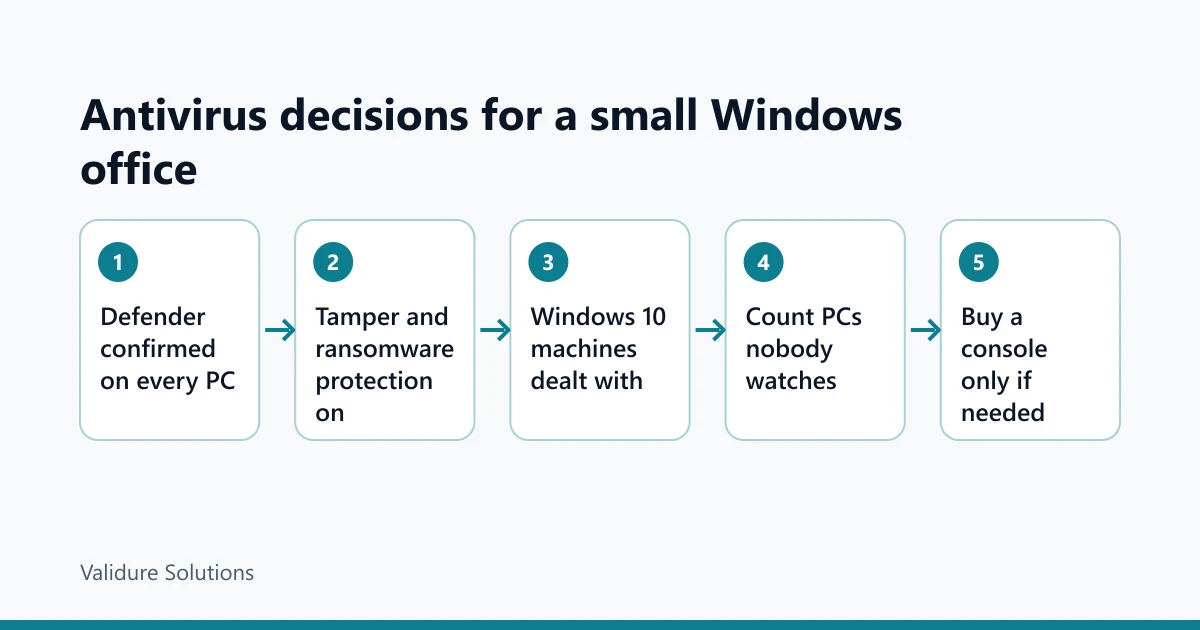
Whatever you choose, these are the things that actually decide whether you're covered. They take about ten minutes per PC the first time, and a few seconds after that.
| Check | What to look for | What a hit means |
|---|---|---|
| Protection on | Windows Security, then Virus and threat protection: real-time protection on, definitions updated in the last day or two | A PC that's quietly unprotected |
| Only one antivirus | Installed programs list: one antivirus product, not two, and no expired trial left behind | An expired trial can leave Defender switched off |
| Tamper protection | Under Virus and threat protection settings, tamper protection on | Malware or a user can switch protection off |
| Ransomware protection | Controlled folder access, under Ransomware protection. It's often off; turn it on for folders with company files and allow your business apps | Without it, any program can rewrite those files |
| Windows version | Settings, then System, then About: Windows 11, or Windows 10 enrolled in Extended Security Updates | An unpatched operating system |
| Updates | Windows Update shows no pending restarts older than a week | Fixes downloaded but not applied |
| Daily accounts | Staff use standard accounts, not administrator, for everyday work | Anything they open can change the whole machine |
| Backups | A recent backup that someone has actually restored from | Ransomware becomes a business stopper |
If you have more than about five PCs and doing this by hand every month feels like a chore nobody will keep up, that's the honest signal that you need a console. That's the point where paying makes sense.
If something does get through
Isolate the machine first: pull the network cable or turn off Wi-Fi. Don't switch it off if you can avoid it, since that can lose evidence. Then change passwords for any account used on that machine from a different, clean device.
There's also a legal side in India. Directions issued by CERT-In, the national computer emergency response team, on 28 April 2022 require service providers, intermediaries, data centres, body corporates and government organisations to report the cyber incidents listed in the directions to CERT-In within six hours of noticing them. The list includes data breaches and unauthorised access to systems. CERT-In's own FAQs discuss how the six hours applies and what can be filed later. This is information, not legal advice; if you think you've had a reportable incident, read the directions on CERT-In's site and speak to someone qualified the same day.
Who this doesn't apply to
An office that runs only Macs, or only Chromebooks, has different built-in protection and different questions. A firm with a regulator that sets security requirements, such as one regulated by RBI or SEBI, should follow those requirements first. And a larger business with its own IT team is past this decision and is choosing between enterprise products.
Sources and checks
Checked on 16 November 2026. Defender Antivirus behaviour alongside other antivirus products: Microsoft Learn, Microsoft Defender Antivirus compatibility and antivirus protection without Defender for Endpoint. Controlled folder access: Microsoft Learn. Defender for Business price, user limit and features: Microsoft's product page; Business Premium price from Microsoft's Microsoft 365 business plans pages, US list prices, verify the price for India before relying on it. Windows 10 end of support and Defender updates through October 2028: the Windows Experience Blog and Microsoft's Defender blog. Lab results: AV-TEST and AV-Comparatives. Incident reporting: CERT-In, directions of 28 April 2022 and the FAQs. The office and its numbers are an example.
Frequently asked questions
Is Windows Defender good enough on its own?
For catching malware on Windows 10 and 11, independent lab tests in 2026 put it at the top alongside paid products. What it lacks for a business is central visibility: nobody sees all your PCs in one place. That's what you'd pay for.
Should I run two antivirus programs to be safer?
No. On Windows 10 and 11, installing another antivirus switches Defender to disabled mode, and two real-time scanners on one PC tend to cause conflicts rather than extra protection.
Our Windows 10 PCs still get Defender updates. Are they safe?
Safer than without, but not safe. Defender's malware definitions continue through October 2028, while Windows 10 itself stopped getting security fixes on 14 October 2025 unless you pay for Extended Security Updates. Upgrade, replace or enrol those machines.
What does Microsoft Defender for Business add over the free one?
According to Microsoft, a central console, endpoint detection and response, vulnerability management, monthly security reports and coverage for Mac, iOS and Android, for up to 300 users and five devices each. It's included in Microsoft 365 Business Premium.
Does antivirus protect us from phishing and fake invoices?
Mostly not. It can block some malicious links and attachments, but it won't stop someone typing a password into a convincing fake page or paying a fraudulent invoice. Two-factor sign-in, a call-back rule for bank detail changes, and training cover those.
When is a paid antivirus worth it for a small office?
When you have more PCs than anyone checks by hand, devices beyond Windows, or a client or insurer asking for proof of monitored protection. Compare any quote with Microsoft's own business option before deciding.
